Showing posts with label Speaker Ways. Show all posts
Showing posts with label Speaker Ways. Show all posts
Tuesday, August 11, 2015
Samsung Galaxy Grand Neo Speaker Solution Jumper Problem Ways Ear peace
Samsung Galaxy Grand Neo Speaker Solution Jumper Problem Ways Ear peace
if we have a speaker problem in Samsung Galaxy Grand Neo we will not be able to hear voice of call.we can temporary solve this issu by using Loud Speaker but to fix this problem we have to do a few basic diagnostics and steps to solve Samsung Galaxy Grand Neo Speaker Solution Jumper Problem Ways Earpeace.

Open Mobile and check speaker points with a meter if they do not show continuty then speaker is dead and if they show a good value chak speaker attachement prints on board do they have value also then change speaker with new one.if speaker changing can not solve this issue check all these parts and track that used in speaker function in Samsung Galaxy Grand Neo.
All parts components and tracks can be found in diagram above so check these components and also clean near by area of these parts.dry it with hot air and ceck all tracks with meter if missing apply jumpers and you may can change resold or replace these parts one by one till you solve Samsung Galaxy Grand Neo Speaker Solution Jumper Problem Ways Earpeace
For more information and new tips and tricks about this problem solution keep visiting this page we will update it if there will be new updates.some related post are also given below you can read more about mobile phone.
Please note that although every diagram & solution posted on our website has been tested by one or more members of our team before posting,so we will not be responsible for any loss or damage, including personal injury.Use this repair solutions at your own risk.
Samsung Galaxy Grand Neo,Nokia,Speaker ,Earpeace,Solution,Jumper,Proble,Ways
Samsung Galaxy Grand Neo Speaker Solution Jumper Problem Ways Speaker Not Working Earpeace
Samsung Galaxy Grand Neo,Nokia,Speaker,Earpeace,Speaker Problem,Speaker Solution,Speaker Jumpers,Speaker Ways
Read more »
if we have a speaker problem in Samsung Galaxy Grand Neo we will not be able to hear voice of call.we can temporary solve this issu by using Loud Speaker but to fix this problem we have to do a few basic diagnostics and steps to solve Samsung Galaxy Grand Neo Speaker Solution Jumper Problem Ways Earpeace.

Open Mobile and check speaker points with a meter if they do not show continuty then speaker is dead and if they show a good value chak speaker attachement prints on board do they have value also then change speaker with new one.if speaker changing can not solve this issue check all these parts and track that used in speaker function in Samsung Galaxy Grand Neo.
All parts components and tracks can be found in diagram above so check these components and also clean near by area of these parts.dry it with hot air and ceck all tracks with meter if missing apply jumpers and you may can change resold or replace these parts one by one till you solve Samsung Galaxy Grand Neo Speaker Solution Jumper Problem Ways Earpeace
For more information and new tips and tricks about this problem solution keep visiting this page we will update it if there will be new updates.some related post are also given below you can read more about mobile phone.
Please note that although every diagram & solution posted on our website has been tested by one or more members of our team before posting,so we will not be responsible for any loss or damage, including personal injury.Use this repair solutions at your own risk.
Samsung Galaxy Grand Neo,Nokia,Speaker ,Earpeace,Solution,Jumper,Proble,Ways
Samsung Galaxy Grand Neo Speaker Solution Jumper Problem Ways Speaker Not Working Earpeace
Samsung Galaxy Grand Neo,Nokia,Speaker,Earpeace,Speaker Problem,Speaker Solution,Speaker Jumpers,Speaker Ways

Nokia Asha 302 speaker ringer problem solution
Nokia Asha 302 speaker ringer problem solution
nokia Asha 302 speaker, nokia Asha 302 ispikar jumper, nokia Asha 302 spekar jumpear, nokia Asha 302 laud speker problems, nokia Asha 302 ringer solution, nAsha 302 ringer problem, nokia Asha 302 speaker ringer problem, nokia Asha 302 earphone problem, nokia Asha 302 rinnger problem solution,

Nokia Asha 302 speaker ringer problem solution nokia Asha 302 speaker problem solution , nokia Asha 302 earpiece problem , Asha 302 speaker problem , nokia Asha 302 ringer spkir problam, nokia Asha 302 ringer problems, nokiaAsha 302speaker,
Read more »
nokia Asha 302 speaker, nokia Asha 302 ispikar jumper, nokia Asha 302 spekar jumpear, nokia Asha 302 laud speker problems, nokia Asha 302 ringer solution, nAsha 302 ringer problem, nokia Asha 302 speaker ringer problem, nokia Asha 302 earphone problem, nokia Asha 302 rinnger problem solution,
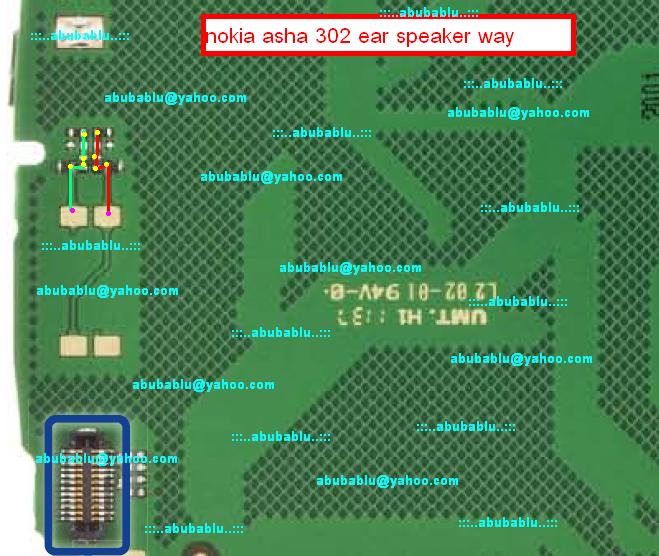
Nokia Asha 302 speaker ringer problem solution nokia Asha 302 speaker problem solution , nokia Asha 302 earpiece problem , Asha 302 speaker problem , nokia Asha 302 ringer spkir problam, nokia Asha 302 ringer problems, nokiaAsha 302speaker,
IPhone 5s Speaker Solution Jumper Problem Ways Earpeace
IPhone 5s Speaker Solution Jumper Problem Ways Earpeace
if we have a speaker problem in IPhone 5s we will not be able to hear voice of call.we can temporary solve this issu by using Loud Speaker but to fix this problem we have to do a few basic diagnostics and steps to solve IPhone 5s Speaker Solution Jumper Problem Ways Earpeace.

Open Mobile and check speaker points with a meter if they do not show continuty then speaker is dead and if they show a good value chak speaker attachement prints on board do they have value also then change speaker with new one.if speaker changing can not solve this issue check all these parts and track that used in speaker function in IPhone 5s.
All parts components and tracks can be found in diagram above so check these components and also clean near by area of these parts.dry it with hot air and ceck all tracks with meter if missing apply jumpers and you may can change resold or replace these parts one by one till you solve IPhone 5s Speaker Solution Jumper Problem Ways Earpeace
For more information and new tips and tricks about this problem solution keep visiting this page we will update it if there will be new updates.some related post are also given below you can read more about mobile phone.
Please note that although every diagram & solution posted on our website has been tested by one or more members of our team before posting,so we will not be responsible for any loss or damage, including personal injury.Use this repair solutions at your own risk.
IPhone 5s,Nokia,Speaker ,Earpeace,Solution,Jumper,Proble,Ways
IPhone 5s Speaker Solution Jumper Problem Ways Speaker Not Working Earpeace
IPhone 5s,Nokia,Speaker,Earpeace,Speaker Problem,Speaker Solution,Speaker Jumpers,Speaker Ways
Read more »
if we have a speaker problem in IPhone 5s we will not be able to hear voice of call.we can temporary solve this issu by using Loud Speaker but to fix this problem we have to do a few basic diagnostics and steps to solve IPhone 5s Speaker Solution Jumper Problem Ways Earpeace.
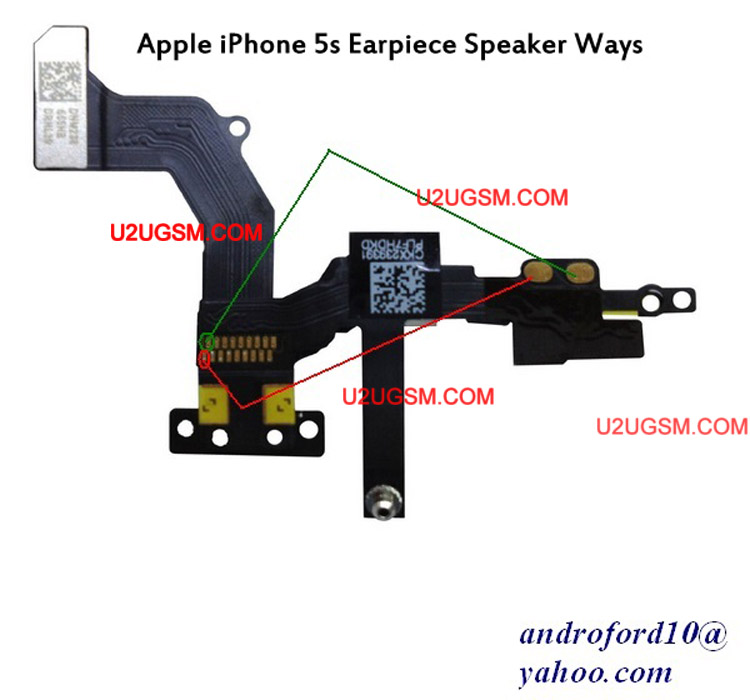
Open Mobile and check speaker points with a meter if they do not show continuty then speaker is dead and if they show a good value chak speaker attachement prints on board do they have value also then change speaker with new one.if speaker changing can not solve this issue check all these parts and track that used in speaker function in IPhone 5s.
All parts components and tracks can be found in diagram above so check these components and also clean near by area of these parts.dry it with hot air and ceck all tracks with meter if missing apply jumpers and you may can change resold or replace these parts one by one till you solve IPhone 5s Speaker Solution Jumper Problem Ways Earpeace
For more information and new tips and tricks about this problem solution keep visiting this page we will update it if there will be new updates.some related post are also given below you can read more about mobile phone.
Please note that although every diagram & solution posted on our website has been tested by one or more members of our team before posting,so we will not be responsible for any loss or damage, including personal injury.Use this repair solutions at your own risk.
IPhone 5s,Nokia,Speaker ,Earpeace,Solution,Jumper,Proble,Ways
IPhone 5s Speaker Solution Jumper Problem Ways Speaker Not Working Earpeace
IPhone 5s,Nokia,Speaker,Earpeace,Speaker Problem,Speaker Solution,Speaker Jumpers,Speaker Ways
Samsung Galaxy Alpha SM-G850 Speaker Solution Jumper Problem Ways Earpeace
Samsung Galaxy Alpha SM-G850 Speaker Solution Jumper Problem Ways Earpeace
if we have a speaker problem in Samsung Galaxy Alpha SM-G850 we will not be able to hear voice of call.we can temporary solve this issu by using Loud Speaker but to fix this problem we have to do a few basic diagnostics and steps to solve Samsung Galaxy Alpha SM-G850 Speaker Solution Jumper Problem Ways Earpeace.

Open Mobile and check speaker points with a meter if they do not show continuty then speaker is dead and if they show a good value chak speaker attachement prints on board do they have value also then change speaker with new one.if speaker changing can not solve this issue check all these parts and track that used in speaker function in Samsung Galaxy Alpha SM-G850.
All parts components and tracks can be found in diagram above so check these components and also clean near by area of these parts.dry it with hot air and ceck all tracks with meter if missing apply jumpers and you may can change resold or replace these parts one by one till you solve Samsung Galaxy Alpha SM-G850 Speaker Solution Jumper Problem Ways Earpeace
For more information and new tips and tricks about this problem solution keep visiting this page we will update it if there will be new updates.some related post are also given below you can read more about mobile phone.
Please note that although every diagram & solution posted on our website has been tested by one or more members of our team before posting,so we will not be responsible for any loss or damage, including personal injury.Use this repair solutions at your own risk.
Samsung Galaxy Alpha SM-G850,Nokia,Speaker ,Earpeace,Solution,Jumper,Proble,Ways
Samsung Galaxy Alpha SM-G850 Speaker Solution Jumper Problem Ways Speaker Not Working Earpeace
Samsung Galaxy Alpha SM-G850,Nokia,Speaker,Earpeace,Speaker Problem,Speaker Solution,Speaker Jumpers,Speaker Ways
Read more »
if we have a speaker problem in Samsung Galaxy Alpha SM-G850 we will not be able to hear voice of call.we can temporary solve this issu by using Loud Speaker but to fix this problem we have to do a few basic diagnostics and steps to solve Samsung Galaxy Alpha SM-G850 Speaker Solution Jumper Problem Ways Earpeace.
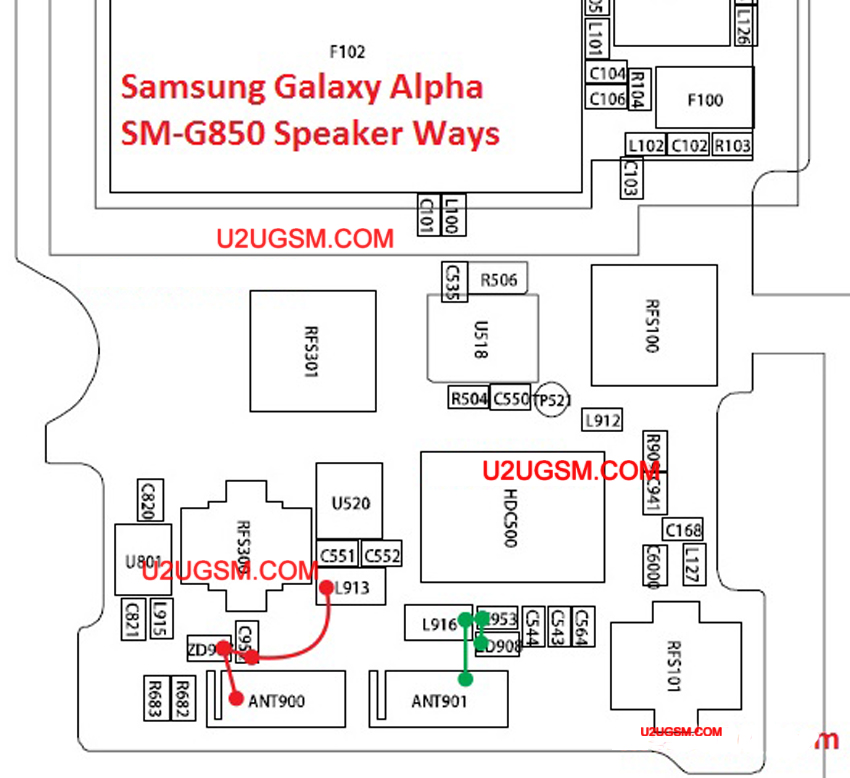
Open Mobile and check speaker points with a meter if they do not show continuty then speaker is dead and if they show a good value chak speaker attachement prints on board do they have value also then change speaker with new one.if speaker changing can not solve this issue check all these parts and track that used in speaker function in Samsung Galaxy Alpha SM-G850.
All parts components and tracks can be found in diagram above so check these components and also clean near by area of these parts.dry it with hot air and ceck all tracks with meter if missing apply jumpers and you may can change resold or replace these parts one by one till you solve Samsung Galaxy Alpha SM-G850 Speaker Solution Jumper Problem Ways Earpeace
For more information and new tips and tricks about this problem solution keep visiting this page we will update it if there will be new updates.some related post are also given below you can read more about mobile phone.
Please note that although every diagram & solution posted on our website has been tested by one or more members of our team before posting,so we will not be responsible for any loss or damage, including personal injury.Use this repair solutions at your own risk.
Samsung Galaxy Alpha SM-G850,Nokia,Speaker ,Earpeace,Solution,Jumper,Proble,Ways
Samsung Galaxy Alpha SM-G850 Speaker Solution Jumper Problem Ways Speaker Not Working Earpeace
Samsung Galaxy Alpha SM-G850,Nokia,Speaker,Earpeace,Speaker Problem,Speaker Solution,Speaker Jumpers,Speaker Ways
Samsung Galaxy Star Advance G350 Speaker Solution Jumper Problem Ways Earpeace
Samsung Galaxy Star Advance G350 Speaker Solution Jumper Problem Ways Earpeace
if we have a speaker problem in Samsung Galaxy Star Advance G350 we will not be able to hear voice of call.we can temporary solve this issu by using Loud Speaker but to fix this problem we have to do a few basic diagnostics and steps to solve Samsung Galaxy Star Advance G350 Speaker Solution Jumper Problem Ways Earpeace.

Open Mobile and check speaker points with a meter if they do not show continuty then speaker is dead and if they show a good value chak speaker attachement prints on board do they have value also then change speaker with new one.if speaker changing can not solve this issue check all these parts and track that used in speaker function in Samsung Galaxy Star Advance G350.
All parts components and tracks can be found in diagram above so check these components and also clean near by area of these parts.dry it with hot air and ceck all tracks with meter if missing apply jumpers and you may can change resold or replace these parts one by one till you solve Samsung Galaxy Star Advance G350 Speaker Solution Jumper Problem Ways Earpeace
For more information and new tips and tricks about this problem solution keep visiting this page we will update it if there will be new updates.some related post are also given below you can read more about mobile phone.
Please note that although every diagram & solution posted on our website has been tested by one or more members of our team before posting,so we will not be responsible for any loss or damage, including personal injury.Use this repair solutions at your own risk.
Samsung Galaxy Star Advance G350,Nokia,Speaker ,Earpeace,Solution,Jumper,Proble,Ways
Samsung Galaxy Star Advance G350 Speaker Solution Jumper Problem Ways Speaker Not Working Earpeace
Samsung Galaxy Star Advance G350,Nokia,Speaker,Earpeace,Speaker Problem,Speaker Solution,Speaker Jumpers,Speaker Ways
Read more »
if we have a speaker problem in Samsung Galaxy Star Advance G350 we will not be able to hear voice of call.we can temporary solve this issu by using Loud Speaker but to fix this problem we have to do a few basic diagnostics and steps to solve Samsung Galaxy Star Advance G350 Speaker Solution Jumper Problem Ways Earpeace.

Open Mobile and check speaker points with a meter if they do not show continuty then speaker is dead and if they show a good value chak speaker attachement prints on board do they have value also then change speaker with new one.if speaker changing can not solve this issue check all these parts and track that used in speaker function in Samsung Galaxy Star Advance G350.
All parts components and tracks can be found in diagram above so check these components and also clean near by area of these parts.dry it with hot air and ceck all tracks with meter if missing apply jumpers and you may can change resold or replace these parts one by one till you solve Samsung Galaxy Star Advance G350 Speaker Solution Jumper Problem Ways Earpeace
For more information and new tips and tricks about this problem solution keep visiting this page we will update it if there will be new updates.some related post are also given below you can read more about mobile phone.
Please note that although every diagram & solution posted on our website has been tested by one or more members of our team before posting,so we will not be responsible for any loss or damage, including personal injury.Use this repair solutions at your own risk.
Samsung Galaxy Star Advance G350,Nokia,Speaker ,Earpeace,Solution,Jumper,Proble,Ways
Samsung Galaxy Star Advance G350 Speaker Solution Jumper Problem Ways Speaker Not Working Earpeace
Samsung Galaxy Star Advance G350,Nokia,Speaker,Earpeace,Speaker Problem,Speaker Solution,Speaker Jumpers,Speaker Ways
Samsung Galaxy Grand Neo Speaker Solution Jumper Problem Ways Ear peace
Samsung Galaxy Grand Neo Speaker Solution Jumper Problem Ways Ear peace
if we have a speaker problem in Samsung Galaxy Grand Neo we will not be able to hear voice of call.we can temporary solve this issu by using Loud Speaker but to fix this problem we have to do a few basic diagnostics and steps to solve Samsung Galaxy Grand Neo Speaker Solution Jumper Problem Ways Earpeace.

Open Mobile and check speaker points with a meter if they do not show continuty then speaker is dead and if they show a good value chak speaker attachement prints on board do they have value also then change speaker with new one.if speaker changing can not solve this issue check all these parts and track that used in speaker function in Samsung Galaxy Grand Neo.
All parts components and tracks can be found in diagram above so check these components and also clean near by area of these parts.dry it with hot air and ceck all tracks with meter if missing apply jumpers and you may can change resold or replace these parts one by one till you solve Samsung Galaxy Grand Neo Speaker Solution Jumper Problem Ways Earpeace
For more information and new tips and tricks about this problem solution keep visiting this page we will update it if there will be new updates.some related post are also given below you can read more about mobile phone.
Please note that although every diagram & solution posted on our website has been tested by one or more members of our team before posting,so we will not be responsible for any loss or damage, including personal injury.Use this repair solutions at your own risk.
Samsung Galaxy Grand Neo,Nokia,Speaker ,Earpeace,Solution,Jumper,Proble,Ways
Samsung Galaxy Grand Neo Speaker Solution Jumper Problem Ways Speaker Not Working Earpeace
Samsung Galaxy Grand Neo,Nokia,Speaker,Earpeace,Speaker Problem,Speaker Solution,Speaker Jumpers,Speaker Ways
Read more »
if we have a speaker problem in Samsung Galaxy Grand Neo we will not be able to hear voice of call.we can temporary solve this issu by using Loud Speaker but to fix this problem we have to do a few basic diagnostics and steps to solve Samsung Galaxy Grand Neo Speaker Solution Jumper Problem Ways Earpeace.

Open Mobile and check speaker points with a meter if they do not show continuty then speaker is dead and if they show a good value chak speaker attachement prints on board do they have value also then change speaker with new one.if speaker changing can not solve this issue check all these parts and track that used in speaker function in Samsung Galaxy Grand Neo.
All parts components and tracks can be found in diagram above so check these components and also clean near by area of these parts.dry it with hot air and ceck all tracks with meter if missing apply jumpers and you may can change resold or replace these parts one by one till you solve Samsung Galaxy Grand Neo Speaker Solution Jumper Problem Ways Earpeace
For more information and new tips and tricks about this problem solution keep visiting this page we will update it if there will be new updates.some related post are also given below you can read more about mobile phone.
Please note that although every diagram & solution posted on our website has been tested by one or more members of our team before posting,so we will not be responsible for any loss or damage, including personal injury.Use this repair solutions at your own risk.
Samsung Galaxy Grand Neo,Nokia,Speaker ,Earpeace,Solution,Jumper,Proble,Ways
Samsung Galaxy Grand Neo Speaker Solution Jumper Problem Ways Speaker Not Working Earpeace
Samsung Galaxy Grand Neo,Nokia,Speaker,Earpeace,Speaker Problem,Speaker Solution,Speaker Jumpers,Speaker Ways
Nokia 130 Speaker Solution Jumper Problem Ways Ear peace
Nokia 130 Speaker Solution Jumper Problem Ways Ear peace
if we have a speaker problem in Nokia 130 we will not be able to hear voice of call.we can temporary solve this issu by using Loud Speaker but to fix this problem we have to do a few basic diagnostics and steps to solve Nokia 130 Speaker Solution Jumper Problem Ways Earpeace.

Open Mobile and check speaker points with a meter if they do not show continuty then speaker is dead and if they show a good value chak speaker attachement prints on board do they have value also then change speaker with new one.if speaker changing can not solve this issue check all these parts and track that used in speaker function in Nokia 130.
All parts components and tracks can be found in diagram above so check these components and also clean near by area of these parts.dry it with hot air and ceck all tracks with meter if missing apply jumpers and you may can change resold or replace these parts one by one till you solve Nokia 130 Speaker Solution Jumper Problem Ways Earpeace
For more information and new tips and tricks about this problem solution keep visiting this page we will update it if there will be new updates.some related post are also given below you can read more about mobile phone.
Please note that although every diagram & solution posted on our website has been tested by one or more members of our team before posting,so we will not be responsible for any loss or damage, including personal injury.Use this repair solutions at your own risk.
Nokia 130,Nokia,Speaker ,Earpeace,Solution,Jumper,Proble,Ways
Nokia 130 Speaker Solution Jumper Problem Ways Speaker Not Working Earpeace
Nokia 130,Nokia,Speaker,Earpeace,Speaker Problem,Speaker Solution,Speaker Jumpers,Speaker Ways
Read more »
if we have a speaker problem in Nokia 130 we will not be able to hear voice of call.we can temporary solve this issu by using Loud Speaker but to fix this problem we have to do a few basic diagnostics and steps to solve Nokia 130 Speaker Solution Jumper Problem Ways Earpeace.
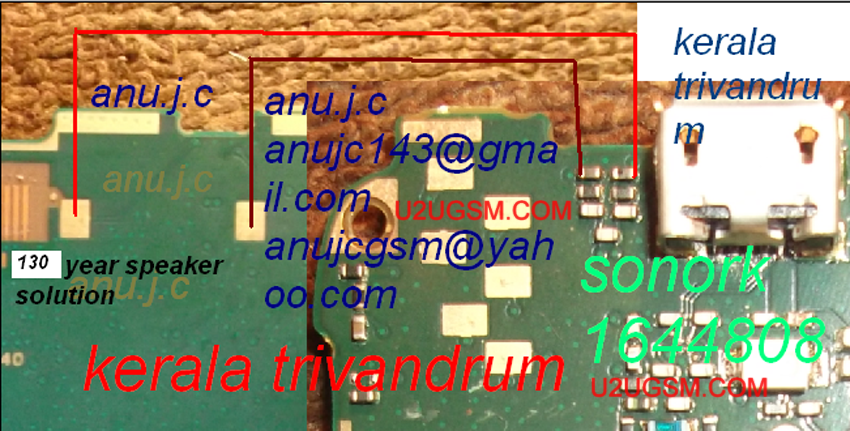
Open Mobile and check speaker points with a meter if they do not show continuty then speaker is dead and if they show a good value chak speaker attachement prints on board do they have value also then change speaker with new one.if speaker changing can not solve this issue check all these parts and track that used in speaker function in Nokia 130.
All parts components and tracks can be found in diagram above so check these components and also clean near by area of these parts.dry it with hot air and ceck all tracks with meter if missing apply jumpers and you may can change resold or replace these parts one by one till you solve Nokia 130 Speaker Solution Jumper Problem Ways Earpeace
For more information and new tips and tricks about this problem solution keep visiting this page we will update it if there will be new updates.some related post are also given below you can read more about mobile phone.
Please note that although every diagram & solution posted on our website has been tested by one or more members of our team before posting,so we will not be responsible for any loss or damage, including personal injury.Use this repair solutions at your own risk.
Nokia 130,Nokia,Speaker ,Earpeace,Solution,Jumper,Proble,Ways
Nokia 130 Speaker Solution Jumper Problem Ways Speaker Not Working Earpeace
Nokia 130,Nokia,Speaker,Earpeace,Speaker Problem,Speaker Solution,Speaker Jumpers,Speaker Ways
BlackBerry 9720 Speaker Solution Jumper Problem Ways Earpeace
BlackBerry 9720 Speaker Solution Jumper Problem Ways Earpeace
if we have a speaker problem in BlackBerry 9720 we will not be able to hear voice of call.we can temporary solve this issu by using Loud Speaker but to fix this problem we have to do a few basic diagnostics and steps to solve BlackBerry 9720 Speaker Solution Jumper Problem Ways Earpeace.

Open Mobile and check speaker points with a meter if they do not show continuty then speaker is dead and if they show a good value chak speaker attachement prints on board do they have value also then change speaker with new one.if speaker changing can not solve this issue check all these parts and track that used in speaker function in BlackBerry 9720.
All parts components and tracks can be found in diagram above so check these components and also clean near by area of these parts.dry it with hot air and ceck all tracks with meter if missing apply jumpers and you may can change resold or replace these parts one by one till you solve BlackBerry 9720 Speaker Solution Jumper Problem Ways Earpeace
For more information and new tips and tricks about this problem solution keep visiting this page we will update it if there will be new updates.some related post are also given below you can read more about mobile phone.
Please note that although every diagram & solution posted on our website has been tested by one or more members of our team before posting,so we will not be responsible for any loss or damage, including personal injury.Use this repair solutions at your own risk.
BlackBerry 9720,Nokia,Speaker ,Earpeace,Solution,Jumper,Proble,Ways
BlackBerry 9720 Speaker Solution Jumper Problem Ways Speaker Not Working Earpeace
BlackBerry 9720,Nokia,Speaker,Earpeace,Speaker Problem,Speaker Solution,Speaker Jumpers,Speaker Ways
Read more »
if we have a speaker problem in BlackBerry 9720 we will not be able to hear voice of call.we can temporary solve this issu by using Loud Speaker but to fix this problem we have to do a few basic diagnostics and steps to solve BlackBerry 9720 Speaker Solution Jumper Problem Ways Earpeace.

Open Mobile and check speaker points with a meter if they do not show continuty then speaker is dead and if they show a good value chak speaker attachement prints on board do they have value also then change speaker with new one.if speaker changing can not solve this issue check all these parts and track that used in speaker function in BlackBerry 9720.
All parts components and tracks can be found in diagram above so check these components and also clean near by area of these parts.dry it with hot air and ceck all tracks with meter if missing apply jumpers and you may can change resold or replace these parts one by one till you solve BlackBerry 9720 Speaker Solution Jumper Problem Ways Earpeace
For more information and new tips and tricks about this problem solution keep visiting this page we will update it if there will be new updates.some related post are also given below you can read more about mobile phone.
Please note that although every diagram & solution posted on our website has been tested by one or more members of our team before posting,so we will not be responsible for any loss or damage, including personal injury.Use this repair solutions at your own risk.
BlackBerry 9720,Nokia,Speaker ,Earpeace,Solution,Jumper,Proble,Ways
BlackBerry 9720 Speaker Solution Jumper Problem Ways Speaker Not Working Earpeace
BlackBerry 9720,Nokia,Speaker,Earpeace,Speaker Problem,Speaker Solution,Speaker Jumpers,Speaker Ways
Samsung Grand Neo I9060 Speaker Solution Jumper Problem Ways Earpeace
Samsung Grand Neo I9060 Speaker Solution Jumper Problem Ways Earpeace
if we have a speaker problem in Samsung Grand Neo I9060 we will not be able to hear voice of call.we can temporary solve this issu by using Loud Speaker but to fix this problem we have to do a few basic diagnostics and steps to solve Samsung Grand Neo I9060 Speaker Solution Jumper Problem Ways Earpeace.

Open Mobile and check speaker points with a meter if they do not show continuty then speaker is dead and if they show a good value chak speaker attachement prints on board do they have value also then change speaker with new one.if speaker changing can not solve this issue check all these parts and track that used in speaker function in Samsung Grand Neo I9060.
All parts components and tracks can be found in diagram above so check these components and also clean near by area of these parts.dry it with hot air and ceck all tracks with meter if missing apply jumpers and you may can change resold or replace these parts one by one till you solve Samsung Grand Neo I9060 Speaker Solution Jumper Problem Ways Earpeace
For more information and new tips and tricks about this problem solution keep visiting this page we will update it if there will be new updates.some related post are also given below you can read more about mobile phone.
Please note that although every diagram & solution posted on our website has been tested by one or more members of our team before posting,so we will not be responsible for any loss or damage, including personal injury.Use this repair solutions at your own risk.
Samsung Grand Neo I9060,Nokia,Speaker ,Earpeace,Solution,Jumper,Problem,Ways
Samsung Grand Neo I9060 Speaker Solution Jumper Problem Ways Speaker Not Working Earpeace
Samsung Grand Neo I9060,Nokia,Speaker,Earpeace,Speaker Problem,Speaker Solution,Speaker Jumpers,Speaker Ways
Read more »
if we have a speaker problem in Samsung Grand Neo I9060 we will not be able to hear voice of call.we can temporary solve this issu by using Loud Speaker but to fix this problem we have to do a few basic diagnostics and steps to solve Samsung Grand Neo I9060 Speaker Solution Jumper Problem Ways Earpeace.

Open Mobile and check speaker points with a meter if they do not show continuty then speaker is dead and if they show a good value chak speaker attachement prints on board do they have value also then change speaker with new one.if speaker changing can not solve this issue check all these parts and track that used in speaker function in Samsung Grand Neo I9060.
All parts components and tracks can be found in diagram above so check these components and also clean near by area of these parts.dry it with hot air and ceck all tracks with meter if missing apply jumpers and you may can change resold or replace these parts one by one till you solve Samsung Grand Neo I9060 Speaker Solution Jumper Problem Ways Earpeace
For more information and new tips and tricks about this problem solution keep visiting this page we will update it if there will be new updates.some related post are also given below you can read more about mobile phone.
Please note that although every diagram & solution posted on our website has been tested by one or more members of our team before posting,so we will not be responsible for any loss or damage, including personal injury.Use this repair solutions at your own risk.
Samsung Grand Neo I9060,Nokia,Speaker ,Earpeace,Solution,Jumper,Problem,Ways
Samsung Grand Neo I9060 Speaker Solution Jumper Problem Ways Speaker Not Working Earpeace
Samsung Grand Neo I9060,Nokia,Speaker,Earpeace,Speaker Problem,Speaker Solution,Speaker Jumpers,Speaker Ways
Subscribe to:
Posts (Atom)