Showing posts with label Samsung Galaxy Star S5280. Show all posts
Showing posts with label Samsung Galaxy Star S5280. Show all posts
Tuesday, August 11, 2015
Samsung Galaxy Star S5280 Usb Charging Problem Solution Jumper Ways
Samsung Galaxy Star S5280 Usb Charging Problem Solution Jumper Ways
Problem:-
Samsung Galaxy Star S5280 usb charging solution,
Samsung Galaxy Star S5280 usb not recognised not detected
Diagnostics:-
Plug in usb cable into PC and Phone jack, Read notifications on the screen phone recognised or not. Check out you can save data to memory card or not. Replace usb data cable and try again.

Replace Usb charger and try again can it charge or not.
Solution:-
If you are facing charging problem in Samsung Galaxy Star S5280 and have test all above steps to solve this problem in it. Dis assemble the phone and then look at phone for water and carbon damages. Make it clean with electronics cleaner and apply heat with heat gun to make it dry.
Keep in mind heat should not be more and much because it can harm your skin and damage the mother board. So keep it in normal flow and look at the parts carefully.
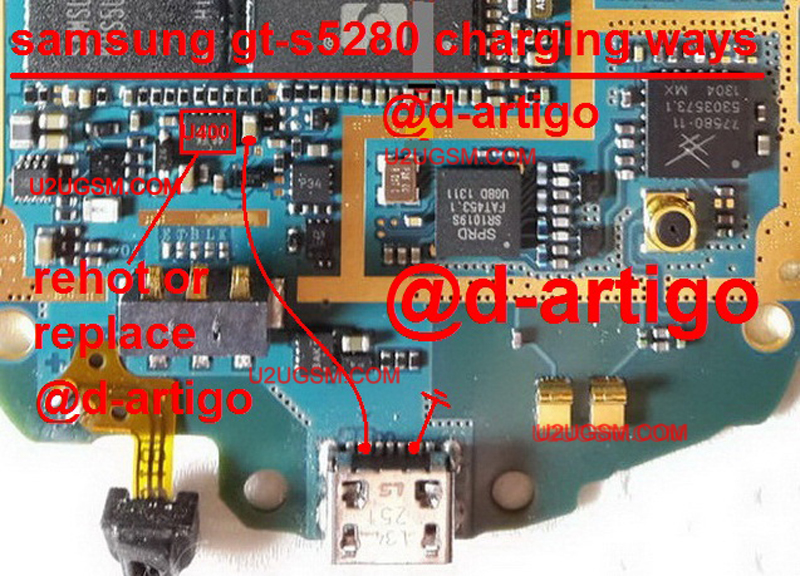
Track all these paths and components as shown in diagram above. all these tracks are given in different colors so that you can find out the jumper ways easily.
Samsung Galaxy Star S5280,Usb,Charging,Problem,Solution,Jumper,Ways
usb not charging, Usb not recognized, charging not save, not charging
Read more »
Problem:-
Samsung Galaxy Star S5280 usb charging solution,
Samsung Galaxy Star S5280 usb not recognised not detected
Diagnostics:-
Plug in usb cable into PC and Phone jack, Read notifications on the screen phone recognised or not. Check out you can save data to memory card or not. Replace usb data cable and try again.
Replace Usb charger and try again can it charge or not.
Solution:-
If you are facing charging problem in Samsung Galaxy Star S5280 and have test all above steps to solve this problem in it. Dis assemble the phone and then look at phone for water and carbon damages. Make it clean with electronics cleaner and apply heat with heat gun to make it dry.
Keep in mind heat should not be more and much because it can harm your skin and damage the mother board. So keep it in normal flow and look at the parts carefully.
Track all these paths and components as shown in diagram above. all these tracks are given in different colors so that you can find out the jumper ways easily.
Samsung Galaxy Star S5280,Usb,Charging,Problem,Solution,Jumper,Ways
usb not charging, Usb not recognized, charging not save, not charging

Samsung Galaxy Star S5280 Mic Solution Jumper Problem Ways Microphone
Samsung Galaxy Star S5280 Mic Solution Jumper Problem Ways Microphone
Samsung Galaxy Star S5280 Mic problem can be solve in a few steps as given in this post.How we can find Mic fault into a cellphone is very easy way.when ever our voice can not reach to destination monbile phone or we can not recored our own voice in voice recorder of cell phone it means it Mic not working.If a Samsung Galaxy Star S5280 Mic is not working then Mic problem can be solve in given bellow steps that are provided in diagram bellow.

First step is open mobile and check Samsung Galaxy Star S5280 Mic points on borad if there is a good value in it then change Mic with new one.Problem will be solve. if only mic points do not show value then chek all mic track and parts that are used in mic function in Samsung Galaxy Star S5280.all mic parts and track are given in bellow diagram check all these parts and components and if necesory resold or change them.this will help you in Samsung Galaxy Star S5280 Mic Solution Jumper Problem Ways Microphone
For more information and new tips and tricks about this problem solution keep visiting this page we will update it if there will be new updates.some related post are also given below you can read more about mobile phone.
Please note that although every diagram & solution posted on our website has been tested by one or more members of our team before posting,so we will not be responsible for any loss or damage, including personal injury.Use this repair solutions at your own risk.
Samsung Galaxy Star S5280,Nokia,Mic,microphone,Solution,Jumper,Proble,Ways
Samsung Galaxy Star S5280 Mic Solution Jumper Problem Ways Mic Not Working Microphone
Samsung Galaxy Star S5280,Nokia,Mic,Microphone,Mic Problem,Mic Solution,Mic Jumpers,Mic Ways
Read more »
Samsung Galaxy Star S5280 Mic problem can be solve in a few steps as given in this post.How we can find Mic fault into a cellphone is very easy way.when ever our voice can not reach to destination monbile phone or we can not recored our own voice in voice recorder of cell phone it means it Mic not working.If a Samsung Galaxy Star S5280 Mic is not working then Mic problem can be solve in given bellow steps that are provided in diagram bellow.

First step is open mobile and check Samsung Galaxy Star S5280 Mic points on borad if there is a good value in it then change Mic with new one.Problem will be solve. if only mic points do not show value then chek all mic track and parts that are used in mic function in Samsung Galaxy Star S5280.all mic parts and track are given in bellow diagram check all these parts and components and if necesory resold or change them.this will help you in Samsung Galaxy Star S5280 Mic Solution Jumper Problem Ways Microphone
For more information and new tips and tricks about this problem solution keep visiting this page we will update it if there will be new updates.some related post are also given below you can read more about mobile phone.
Please note that although every diagram & solution posted on our website has been tested by one or more members of our team before posting,so we will not be responsible for any loss or damage, including personal injury.Use this repair solutions at your own risk.
Samsung Galaxy Star S5280,Nokia,Mic,microphone,Solution,Jumper,Proble,Ways
Samsung Galaxy Star S5280 Mic Solution Jumper Problem Ways Mic Not Working Microphone
Samsung Galaxy Star S5280,Nokia,Mic,Microphone,Mic Problem,Mic Solution,Mic Jumpers,Mic Ways
Subscribe to:
Posts (Atom)