Showing posts with label Charging. Show all posts
Showing posts with label Charging. Show all posts
Tuesday, August 11, 2015
Samsung Galaxy Core Plus Charging Solution Jumper Problem Ways Charging Not Supported
Samsung Galaxy Core Plus Charging Solution Jumper Problem Ways Charging Not Supported
Charging problem in Samsung Galaxy Core Plus can be due to charging pin broken damage and due to water damages.in case of charging problem mobile can not save power in battery and may it shows fake charging in it.in fake charging condition you can only see charging signe in mobile but it will not save any electricity power in it.

to sole charging problem Samsung Galaxy Core Plus Charging Solution Jumper Problem Ways Charging Not Supported
after disassamply of mobile phone you have to do a few steps as shown in above diagram.check charging jack and its points do they hae good value if yes then change chager and check it and if charging points at mother board do not show accourate value with meter then you hae to check all parts and tracks that are given in diagram of Samsung Galaxy Core Plus.
look at mother board vary carefully if there is any rust or carbon and water damage or may any component is damage.if any track is missing apply jumpers as given and if any part is damage or broken then replace it with new one.
For more information and new tips and tricks about this problem solution keep visiting this page we will update it if there will be new updates.some related post are also given below you can read more about mobile phone.
Please note that although every diagram & solution posted on our website has been tested by one or more members of our team before posting,so we will not be responsible for any loss or damage, including personal injury.Use this repair solutions at your own risk.
Samsung Galaxy Core Plus,Nokia,Charging,Solution,Jumper,Problem,Ways
Samsung Galaxy Core Plus Charging Solution Jumper Problem Ways No Charging Not Supported
Samsung Galaxy Core Plus,Nokia,Charging,Charging Problem,Charging Solution,Charging Jumpers,Charging Ways
Read more »
Charging problem in Samsung Galaxy Core Plus can be due to charging pin broken damage and due to water damages.in case of charging problem mobile can not save power in battery and may it shows fake charging in it.in fake charging condition you can only see charging signe in mobile but it will not save any electricity power in it.
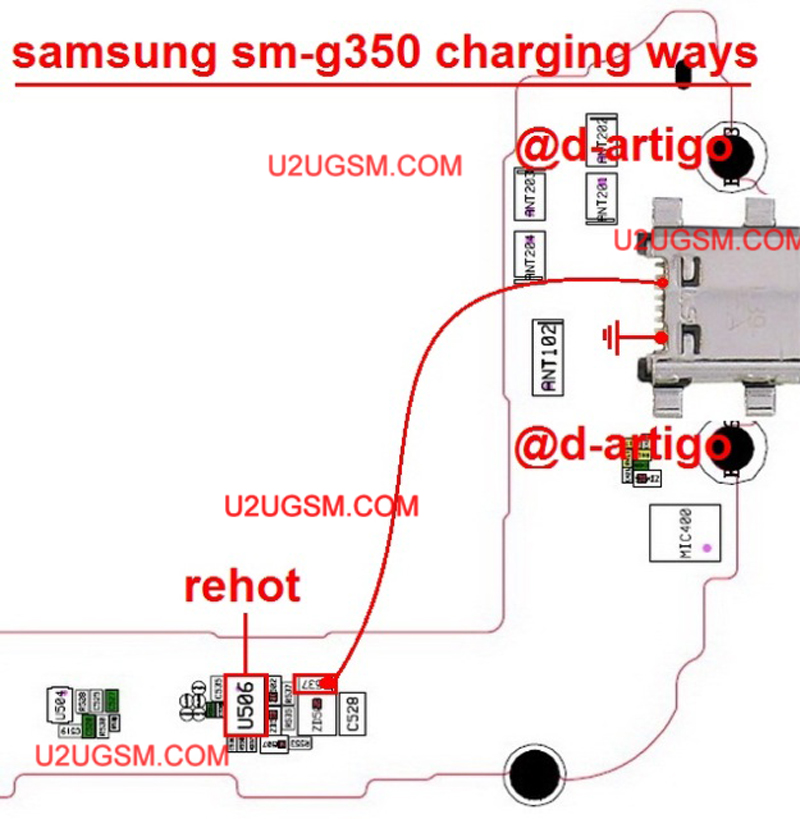
to sole charging problem Samsung Galaxy Core Plus Charging Solution Jumper Problem Ways Charging Not Supported
after disassamply of mobile phone you have to do a few steps as shown in above diagram.check charging jack and its points do they hae good value if yes then change chager and check it and if charging points at mother board do not show accourate value with meter then you hae to check all parts and tracks that are given in diagram of Samsung Galaxy Core Plus.
look at mother board vary carefully if there is any rust or carbon and water damage or may any component is damage.if any track is missing apply jumpers as given and if any part is damage or broken then replace it with new one.
For more information and new tips and tricks about this problem solution keep visiting this page we will update it if there will be new updates.some related post are also given below you can read more about mobile phone.
Please note that although every diagram & solution posted on our website has been tested by one or more members of our team before posting,so we will not be responsible for any loss or damage, including personal injury.Use this repair solutions at your own risk.
Samsung Galaxy Core Plus,Nokia,Charging,Solution,Jumper,Problem,Ways
Samsung Galaxy Core Plus Charging Solution Jumper Problem Ways No Charging Not Supported
Samsung Galaxy Core Plus,Nokia,Charging,Charging Problem,Charging Solution,Charging Jumpers,Charging Ways

Samsung Galaxy Star Advance Charging Solution Jumper Problem Ways Charging Not Supported
Samsung Galaxy Star Advance Charging Solution Jumper Problem Ways Charging Not Supported
Charging problem in Samsung Galaxy Star Advance can be due to charging pin broken damage and due to water damages.in case of charging problem mobile can not save power in battery and may it shows fake charging in it.in fake charging condition you can only see charging signe in mobile but it will not save any electricity power in it.

to sole charging problem Samsung Galaxy Star Advance Charging Solution Jumper Problem Ways Charging Not Supported
after disassamply of mobile phone you have to do a few steps as shown in above diagram.check charging jack and its points do they hae good value if yes then change chager and check it and if charging points at mother board do not show accourate value with meter then you hae to check all parts and tracks that are given in diagram of Samsung Galaxy Star Advance.
look at mother board vary carefully if there is any rust or carbon and water damage or may any component is damage.if any track is missing apply jumpers as given and if any part is damage or broken then replace it with new one.
For more information and new tips and tricks about this problem solution keep visiting this page we will update it if there will be new updates.some related post are also given below you can read more about mobile phone.
Please note that although every diagram & solution posted on our website has been tested by one or more members of our team before posting,so we will not be responsible for any loss or damage, including personal injury.Use this repair solutions at your own risk.
Samsung Galaxy Star Advance,Nokia,Charging,Solution,Jumper,Problem,Ways
Samsung Galaxy Star Advance Charging Solution Jumper Problem Ways No Charging Not Supported
Samsung Galaxy Star Advance,Nokia,Charging,Charging Problem,Charging Solution,Charging Jumpers,Charging Ways
Read more »
Charging problem in Samsung Galaxy Star Advance can be due to charging pin broken damage and due to water damages.in case of charging problem mobile can not save power in battery and may it shows fake charging in it.in fake charging condition you can only see charging signe in mobile but it will not save any electricity power in it.
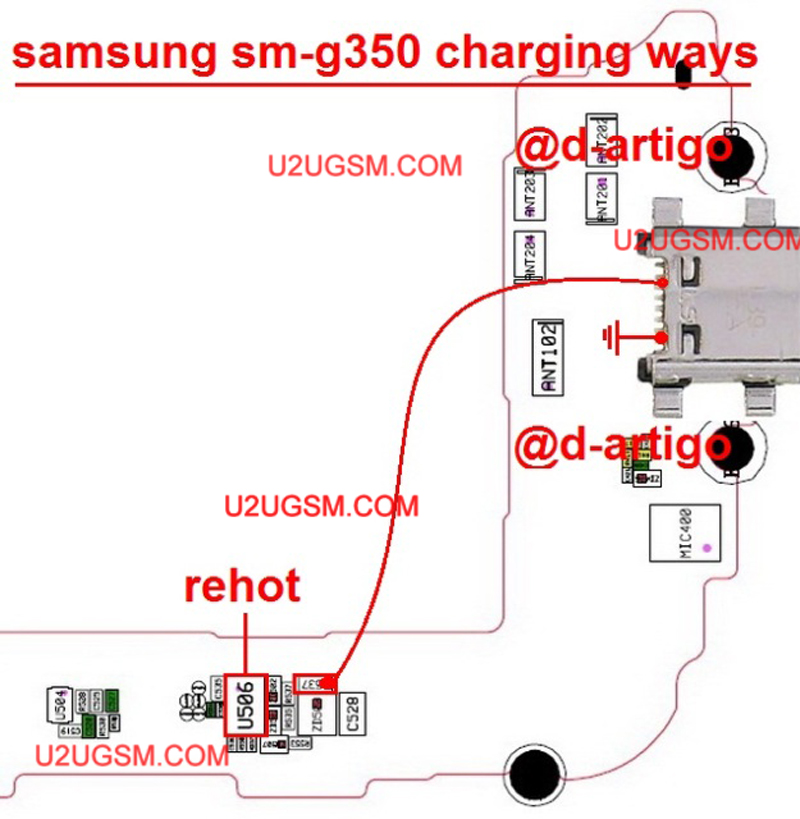
to sole charging problem Samsung Galaxy Star Advance Charging Solution Jumper Problem Ways Charging Not Supported
after disassamply of mobile phone you have to do a few steps as shown in above diagram.check charging jack and its points do they hae good value if yes then change chager and check it and if charging points at mother board do not show accourate value with meter then you hae to check all parts and tracks that are given in diagram of Samsung Galaxy Star Advance.
look at mother board vary carefully if there is any rust or carbon and water damage or may any component is damage.if any track is missing apply jumpers as given and if any part is damage or broken then replace it with new one.
For more information and new tips and tricks about this problem solution keep visiting this page we will update it if there will be new updates.some related post are also given below you can read more about mobile phone.
Please note that although every diagram & solution posted on our website has been tested by one or more members of our team before posting,so we will not be responsible for any loss or damage, including personal injury.Use this repair solutions at your own risk.
Samsung Galaxy Star Advance,Nokia,Charging,Solution,Jumper,Problem,Ways
Samsung Galaxy Star Advance Charging Solution Jumper Problem Ways No Charging Not Supported
Samsung Galaxy Star Advance,Nokia,Charging,Charging Problem,Charging Solution,Charging Jumpers,Charging Ways
Samsung E1232B Charging Solution Jumper Problem Ways Charging Not Supported
Samsung E1232B Charging Solution Jumper Problem Ways Charging Not Supported
Charging problem in Samsung E1232B can be due to charging pin broken damage and due to water damages.in case of charging problem mobile can not save power in battery and may it shows fake charging in it.in fake charging condition you can only see charging signe in mobile but it will not save any electricity power in it.

to sole charging problem Samsung E1232B Charging Solution Jumper Problem Ways Charging Not Supported
after disassamply of mobile phone you have to do a few steps as shown in above diagram.check charging jack and its points do they hae good value if yes then change chager and check it and if charging points at mother board do not show accourate value with meter then you hae to check all parts and tracks that are given in diagram of Samsung E1232B.
look at mother board vary carefully if there is any rust or carbon and water damage or may any component is damage.if any track is missing apply jumpers as given and if any part is damage or broken then replace it with new one.
For more information and new tips and tricks about this problem solution keep visiting this page we will update it if there will be new updates.some related post are also given below you can read more about mobile phone.
Please note that although every diagram & solution posted on our website has been tested by one or more members of our team before posting,so we will not be responsible for any loss or damage, including personal injury.Use this repair solutions at your own risk.
Samsung E1232B,Nokia,Charging,Solution,Jumper,Problem,Ways
Samsung E1232B Charging Solution Jumper Problem Ways No Charging Not Supported
Samsung E1232B,Nokia,Charging,Charging Problem,Charging Solution,Charging Jumpers,Charging Ways
Read more »
Charging problem in Samsung E1232B can be due to charging pin broken damage and due to water damages.in case of charging problem mobile can not save power in battery and may it shows fake charging in it.in fake charging condition you can only see charging signe in mobile but it will not save any electricity power in it.

to sole charging problem Samsung E1232B Charging Solution Jumper Problem Ways Charging Not Supported
after disassamply of mobile phone you have to do a few steps as shown in above diagram.check charging jack and its points do they hae good value if yes then change chager and check it and if charging points at mother board do not show accourate value with meter then you hae to check all parts and tracks that are given in diagram of Samsung E1232B.
look at mother board vary carefully if there is any rust or carbon and water damage or may any component is damage.if any track is missing apply jumpers as given and if any part is damage or broken then replace it with new one.
For more information and new tips and tricks about this problem solution keep visiting this page we will update it if there will be new updates.some related post are also given below you can read more about mobile phone.
Please note that although every diagram & solution posted on our website has been tested by one or more members of our team before posting,so we will not be responsible for any loss or damage, including personal injury.Use this repair solutions at your own risk.
Samsung E1232B,Nokia,Charging,Solution,Jumper,Problem,Ways
Samsung E1232B Charging Solution Jumper Problem Ways No Charging Not Supported
Samsung E1232B,Nokia,Charging,Charging Problem,Charging Solution,Charging Jumpers,Charging Ways
Samsung Galaxy Star S5280 Usb Charging Problem Solution Jumper Ways
Samsung Galaxy Star S5280 Usb Charging Problem Solution Jumper Ways
Problem:-
Samsung Galaxy Star S5280 usb charging solution,
Samsung Galaxy Star S5280 usb not recognised not detected
Diagnostics:-
Plug in usb cable into PC and Phone jack, Read notifications on the screen phone recognised or not. Check out you can save data to memory card or not. Replace usb data cable and try again.

Replace Usb charger and try again can it charge or not.
Solution:-
If you are facing charging problem in Samsung Galaxy Star S5280 and have test all above steps to solve this problem in it. Dis assemble the phone and then look at phone for water and carbon damages. Make it clean with electronics cleaner and apply heat with heat gun to make it dry.
Keep in mind heat should not be more and much because it can harm your skin and damage the mother board. So keep it in normal flow and look at the parts carefully.
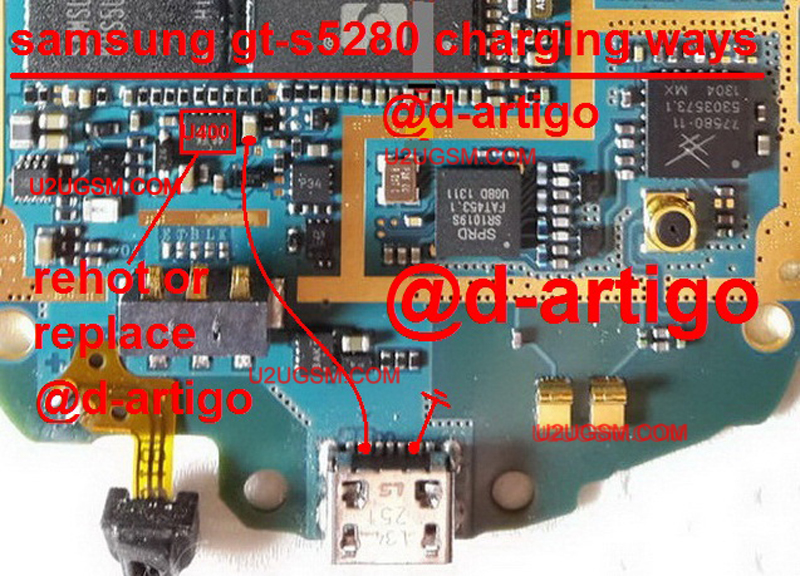
Track all these paths and components as shown in diagram above. all these tracks are given in different colors so that you can find out the jumper ways easily.
Samsung Galaxy Star S5280,Usb,Charging,Problem,Solution,Jumper,Ways
usb not charging, Usb not recognized, charging not save, not charging
Read more »
Problem:-
Samsung Galaxy Star S5280 usb charging solution,
Samsung Galaxy Star S5280 usb not recognised not detected
Diagnostics:-
Plug in usb cable into PC and Phone jack, Read notifications on the screen phone recognised or not. Check out you can save data to memory card or not. Replace usb data cable and try again.
Replace Usb charger and try again can it charge or not.
Solution:-
If you are facing charging problem in Samsung Galaxy Star S5280 and have test all above steps to solve this problem in it. Dis assemble the phone and then look at phone for water and carbon damages. Make it clean with electronics cleaner and apply heat with heat gun to make it dry.
Keep in mind heat should not be more and much because it can harm your skin and damage the mother board. So keep it in normal flow and look at the parts carefully.
Track all these paths and components as shown in diagram above. all these tracks are given in different colors so that you can find out the jumper ways easily.
Samsung Galaxy Star S5280,Usb,Charging,Problem,Solution,Jumper,Ways
usb not charging, Usb not recognized, charging not save, not charging
Samsung Galaxy Tab 2 7.0 P3100 Charging Solution Jumper Problem Ways Charging Not Supported
Samsung Galaxy Tab 2 7.0 P3100 Charging Solution Jumper Problem Ways Charging Not Supported
Charging problem in Samsung Galaxy Tab 2 7.0 P3100 can be due to charging pin broken damage and due to water damages.in case of charging problem mobile can not save power in battery and may it shows fake charging in it.in fake charging condition you can only see charging signe in mobile but it will not save any electricity power in it.

to sole charging problem Samsung Galaxy Tab 2 7.0 P3100 Charging Solution Jumper Problem Ways Charging Not Supported
after disassamply of mobile phone you have to do a few steps as shown in above diagram.check charging jack and its points do they hae good value if yes then change chager and check it and if charging points at mother board do not show accourate value with meter then you hae to check all parts and tracks that are given in diagram of Samsung Galaxy Tab 2 7.0 P3100.
look at mother board vary carefully if there is any rust or carbon and water damage or may any component is damage.if any track is missing apply jumpers as given and if any part is damage or broken then replace it with new one.
For more information and new tips and tricks about this problem solution keep visiting this page we will update it if there will be new updates.some related post are also given below you can read more about mobile phone.
Please note that although every diagram & solution posted on our website has been tested by one or more members of our team before posting,so we will not be responsible for any loss or damage, including personal injury.Use this repair solutions at your own risk.
Samsung Galaxy Tab 2 7.0 P3100,Nokia,Charging,Solution,Jumper,Problem,Ways
Samsung Galaxy Tab 2 7.0 P3100 Charging Solution Jumper Problem Ways No Charging Not Supported
Samsung Galaxy Tab 2 7.0 P3100,Nokia,Charging,Charging Problem,Charging Solution,Charging Jumpers,Charging Ways
Read more »
Charging problem in Samsung Galaxy Tab 2 7.0 P3100 can be due to charging pin broken damage and due to water damages.in case of charging problem mobile can not save power in battery and may it shows fake charging in it.in fake charging condition you can only see charging signe in mobile but it will not save any electricity power in it.

to sole charging problem Samsung Galaxy Tab 2 7.0 P3100 Charging Solution Jumper Problem Ways Charging Not Supported
after disassamply of mobile phone you have to do a few steps as shown in above diagram.check charging jack and its points do they hae good value if yes then change chager and check it and if charging points at mother board do not show accourate value with meter then you hae to check all parts and tracks that are given in diagram of Samsung Galaxy Tab 2 7.0 P3100.
look at mother board vary carefully if there is any rust or carbon and water damage or may any component is damage.if any track is missing apply jumpers as given and if any part is damage or broken then replace it with new one.
For more information and new tips and tricks about this problem solution keep visiting this page we will update it if there will be new updates.some related post are also given below you can read more about mobile phone.
Please note that although every diagram & solution posted on our website has been tested by one or more members of our team before posting,so we will not be responsible for any loss or damage, including personal injury.Use this repair solutions at your own risk.
Samsung Galaxy Tab 2 7.0 P3100,Nokia,Charging,Solution,Jumper,Problem,Ways
Samsung Galaxy Tab 2 7.0 P3100 Charging Solution Jumper Problem Ways No Charging Not Supported
Samsung Galaxy Tab 2 7.0 P3100,Nokia,Charging,Charging Problem,Charging Solution,Charging Jumpers,Charging Ways
Samsung I9190 Galaxy S4 mini Fake Charging Problem Solution
Samsung I9190 Galaxy S4 mini Fake Charging Problem Solution is possible with diagram bellow that i am posting here today. The problem is when we plug in charger into the jack it shows charging notification but can not save the charge in to the battery.

To solve this issue in starting troubleshooting and diagnostics we can change the charger and then battery also if not working OK we have to dis assemble the Samsung I9190 Galaxy S4 mini to solve fake charging problem solutions.
Once we have dis assemble the phone try to solve with diagram above and we may have to change charging jack also because in some case charging jack have rust and water damages in that case carbon can be the reason of charging problem and fake charging into it.
Read more »

To solve this issue in starting troubleshooting and diagnostics we can change the charger and then battery also if not working OK we have to dis assemble the Samsung I9190 Galaxy S4 mini to solve fake charging problem solutions.
Once we have dis assemble the phone try to solve with diagram above and we may have to change charging jack also because in some case charging jack have rust and water damages in that case carbon can be the reason of charging problem and fake charging into it.
Nokia 130 Charging Solution Jumper Problem Ways Charging Not Supported
Nokia 130 Charging Solution Jumper Problem Ways Charging Not Supported
Charging problem in Nokia 130 can be due to charging pin broken damage and due to water damages.in case of charging problem mobile can not save power in battery and may it shows fake charging in it.in fake charging condition you can only see charging signe in mobile but it will not save any electricity power in it.

to sole charging problem Nokia 130 Charging Solution Jumper Problem Ways Charging Not Supported
after disassamply of mobile phone you have to do a few steps as shown in above diagram.check charging jack and its points do they hae good value if yes then change chager and check it and if charging points at mother board do not show accourate value with meter then you hae to check all parts and tracks that are given in diagram of Nokia 130.
look at mother board vary carefully if there is any rust or carbon and water damage or may any component is damage.if any track is missing apply jumpers as given and if any part is damage or broken then replace it with new one.
For more information and new tips and tricks about this problem solution keep visiting this page we will update it if there will be new updates.some related post are also given below you can read more about mobile phone.
Please note that although every diagram & solution posted on our website has been tested by one or more members of our team before posting,so we will not be responsible for any loss or damage, including personal injury.Use this repair solutions at your own risk.
Nokia 130,Nokia,Charging,Solution,Jumper,Problem,Ways
Nokia 130 Charging Solution Jumper Problem Ways No Charging Not Supported
Nokia 130,Nokia,Charging,Charging Problem,Charging Solution,Charging Jumpers,Charging Ways
Read more »
Charging problem in Nokia 130 can be due to charging pin broken damage and due to water damages.in case of charging problem mobile can not save power in battery and may it shows fake charging in it.in fake charging condition you can only see charging signe in mobile but it will not save any electricity power in it.

to sole charging problem Nokia 130 Charging Solution Jumper Problem Ways Charging Not Supported
after disassamply of mobile phone you have to do a few steps as shown in above diagram.check charging jack and its points do they hae good value if yes then change chager and check it and if charging points at mother board do not show accourate value with meter then you hae to check all parts and tracks that are given in diagram of Nokia 130.
look at mother board vary carefully if there is any rust or carbon and water damage or may any component is damage.if any track is missing apply jumpers as given and if any part is damage or broken then replace it with new one.
For more information and new tips and tricks about this problem solution keep visiting this page we will update it if there will be new updates.some related post are also given below you can read more about mobile phone.
Please note that although every diagram & solution posted on our website has been tested by one or more members of our team before posting,so we will not be responsible for any loss or damage, including personal injury.Use this repair solutions at your own risk.
Nokia 130,Nokia,Charging,Solution,Jumper,Problem,Ways
Nokia 130 Charging Solution Jumper Problem Ways No Charging Not Supported
Nokia 130,Nokia,Charging,Charging Problem,Charging Solution,Charging Jumpers,Charging Ways
Nokia Lumia 820 Charging Solution Jumper Problem Ways Charging Not Supported
Nokia Lumia 820 Charging Solution Jumper Problem Ways Charging Not Supported
Charging problem in Nokia Lumia 820 can be due to charging pin broken damage and due to water damages.in case of charging problem mobile can not save power in battery and may it shows fake charging in it.in fake charging condition you can only see charging signe in mobile but it will not save any electricity power in it.

to sole charging problem Nokia Lumia 820 Charging Solution Jumper Problem Ways Charging Not Supported
after disassamply of mobile phone you have to do a few steps as shown in above diagram.check charging jack and its points do they hae good value if yes then change chager and check it and if charging points at mother board do not show accourate value with meter then you hae to check all parts and tracks that are given in diagram of Nokia Lumia 820.
look at mother board vary carefully if there is any rust or carbon and water damage or may any component is damage.if any track is missing apply jumpers as given and if any part is damage or broken then replace it with new one.
For more information and new tips and tricks about this problem solution keep visiting this page we will update it if there will be new updates.some related post are also given below you can read more about mobile phone.
Please note that although every diagram & solution posted on our website has been tested by one or more members of our team before posting,so we will not be responsible for any loss or damage, including personal injury.Use this repair solutions at your own risk.
Nokia Lumia 820,Nokia,Charging,Solution,Jumper,Problem,Ways
Nokia Lumia 820 Charging Solution Jumper Problem Ways No Charging Not Supported
Nokia Lumia 820,Nokia,Charging,Charging Problem,Charging Solution,Charging Jumpers,Charging Ways
Read more »
Charging problem in Nokia Lumia 820 can be due to charging pin broken damage and due to water damages.in case of charging problem mobile can not save power in battery and may it shows fake charging in it.in fake charging condition you can only see charging signe in mobile but it will not save any electricity power in it.
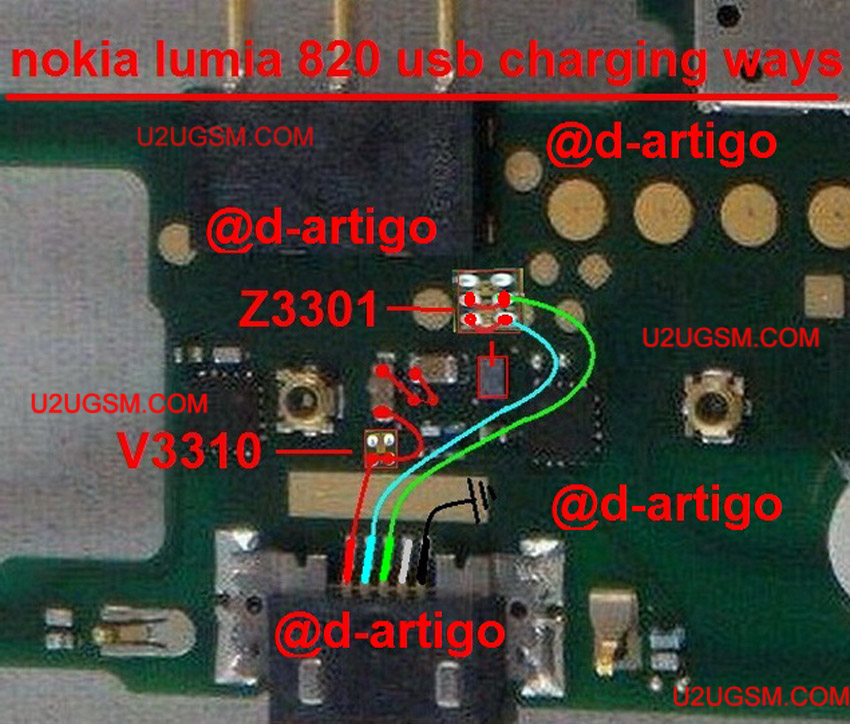
to sole charging problem Nokia Lumia 820 Charging Solution Jumper Problem Ways Charging Not Supported
after disassamply of mobile phone you have to do a few steps as shown in above diagram.check charging jack and its points do they hae good value if yes then change chager and check it and if charging points at mother board do not show accourate value with meter then you hae to check all parts and tracks that are given in diagram of Nokia Lumia 820.
look at mother board vary carefully if there is any rust or carbon and water damage or may any component is damage.if any track is missing apply jumpers as given and if any part is damage or broken then replace it with new one.
For more information and new tips and tricks about this problem solution keep visiting this page we will update it if there will be new updates.some related post are also given below you can read more about mobile phone.
Please note that although every diagram & solution posted on our website has been tested by one or more members of our team before posting,so we will not be responsible for any loss or damage, including personal injury.Use this repair solutions at your own risk.
Nokia Lumia 820,Nokia,Charging,Solution,Jumper,Problem,Ways
Nokia Lumia 820 Charging Solution Jumper Problem Ways No Charging Not Supported
Nokia Lumia 820,Nokia,Charging,Charging Problem,Charging Solution,Charging Jumpers,Charging Ways
Samsung Galaxy Tab 3 7.0 SM-T210 Charging Solution Jumper Problem Ways Charging Not Supported
Samsung Galaxy Tab 3 7.0 SM-T210 Charging Solution Jumper Problem Ways Charging Not Supported
Charging problem in Samsung Galaxy Tab 3 7.0 SM-T210 can be due to charging pin broken damage and due to water damages.in case of charging problem mobile can not save power in battery and may it shows fake charging in it.in fake charging condition you can only see charging signe in mobile but it will not save any electricity power in it.

to sole charging problem Samsung Galaxy Tab 3 7.0 SM-T210 Charging Solution Jumper Problem Ways Charging Not Supported
after disassamply of mobile phone you have to do a few steps as shown in above diagram.check charging jack and its points do they hae good value if yes then change chager and check it and if charging points at mother board do not show accourate value with meter then you hae to check all parts and tracks that are given in diagram of Samsung Galaxy Tab 3 7.0 SM-T210.
look at mother board vary carefully if there is any rust or carbon and water damage or may any component is damage.if any track is missing apply jumpers as given and if any part is damage or broken then replace it with new one.
For more information and new tips and tricks about this problem solution keep visiting this page we will update it if there will be new updates.some related post are also given below you can read more about mobile phone.
Please note that although every diagram & solution posted on our website has been tested by one or more members of our team before posting,so we will not be responsible for any loss or damage, including personal injury.Use this repair solutions at your own risk.
Samsung Galaxy Tab 3 7.0 SM-T210,Nokia,Charging,Solution,Jumper,Problem,Ways
Samsung Galaxy Tab 3 7.0 SM-T210 Charging Solution Jumper Problem Ways No Charging Not Supported
Samsung Galaxy Tab 3 7.0 SM-T210,Nokia,Charging,Charging Problem,Charging Solution,Charging Jumpers,Charging Ways
Read more »
Charging problem in Samsung Galaxy Tab 3 7.0 SM-T210 can be due to charging pin broken damage and due to water damages.in case of charging problem mobile can not save power in battery and may it shows fake charging in it.in fake charging condition you can only see charging signe in mobile but it will not save any electricity power in it.
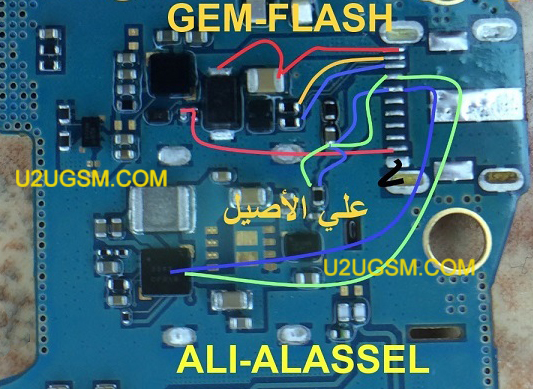
to sole charging problem Samsung Galaxy Tab 3 7.0 SM-T210 Charging Solution Jumper Problem Ways Charging Not Supported
after disassamply of mobile phone you have to do a few steps as shown in above diagram.check charging jack and its points do they hae good value if yes then change chager and check it and if charging points at mother board do not show accourate value with meter then you hae to check all parts and tracks that are given in diagram of Samsung Galaxy Tab 3 7.0 SM-T210.
look at mother board vary carefully if there is any rust or carbon and water damage or may any component is damage.if any track is missing apply jumpers as given and if any part is damage or broken then replace it with new one.
For more information and new tips and tricks about this problem solution keep visiting this page we will update it if there will be new updates.some related post are also given below you can read more about mobile phone.
Please note that although every diagram & solution posted on our website has been tested by one or more members of our team before posting,so we will not be responsible for any loss or damage, including personal injury.Use this repair solutions at your own risk.
Samsung Galaxy Tab 3 7.0 SM-T210,Nokia,Charging,Solution,Jumper,Problem,Ways
Samsung Galaxy Tab 3 7.0 SM-T210 Charging Solution Jumper Problem Ways No Charging Not Supported
Samsung Galaxy Tab 3 7.0 SM-T210,Nokia,Charging,Charging Problem,Charging Solution,Charging Jumpers,Charging Ways
Samsung I9505 Galaxy S4 Charging Solution Jumper Problem Ways Charging Not Supported
Samsung I9505 Galaxy S4 Charging Solution Jumper Problem Ways Charging Not Supported
Charging problem in Samsung I9505 Galaxy S4 can be due to charging pin broken damage and due to water damages.in case of charging problem mobile can not save power in battery and may it shows fake charging in it.in fake charging condition you can only see charging signe in mobile but it will not save any electricity power in it.

to sole charging problem Samsung I9505 Galaxy S4 Charging Solution Jumper Problem Ways Charging Not Supported
after disassamply of mobile phone you have to do a few steps as shown in above diagram.check charging jack and its points do they hae good value if yes then change chager and check it and if charging points at mother board do not show accourate value with meter then you hae to check all parts and tracks that are given in diagram of Samsung I9505 Galaxy S4.

look at mother board vary carefully if there is any rust or carbon and water damage or may any component is damage.if any track is missing apply jumpers as given and if any part is damage or broken then replace it with new one.
For more information and new tips and tricks about this problem solution keep visiting this page we will update it if there will be new updates.some related post are also given below you can read more about mobile phone.

Please note that although every diagram & solution posted on our website has been tested by one or more members of our team before posting,so we will not be responsible for any loss or damage, including personal injury.Use this repair solutions at your own risk.
Samsung I9505 Galaxy S4,Nokia,Charging,Solution,Jumper,Problem,Ways
Samsung I9505 Galaxy S4 Charging Solution Jumper Problem Ways No Charging Not Supported
Samsung I9505 Galaxy S4,Nokia,Charging,Charging Problem,Charging Solution,Charging Jumpers,Charging Ways
Read more »
Charging problem in Samsung I9505 Galaxy S4 can be due to charging pin broken damage and due to water damages.in case of charging problem mobile can not save power in battery and may it shows fake charging in it.in fake charging condition you can only see charging signe in mobile but it will not save any electricity power in it.
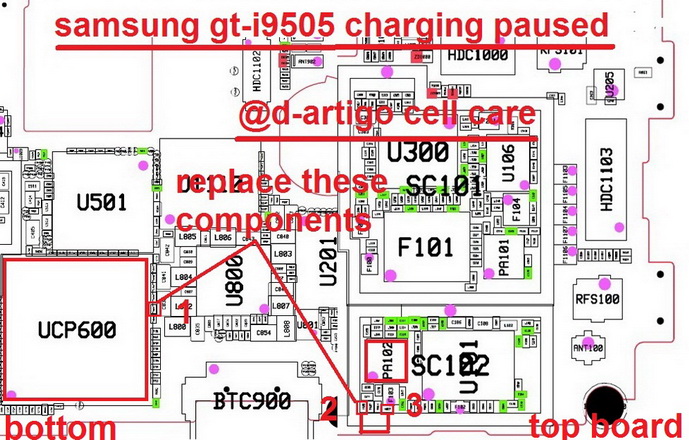
to sole charging problem Samsung I9505 Galaxy S4 Charging Solution Jumper Problem Ways Charging Not Supported
after disassamply of mobile phone you have to do a few steps as shown in above diagram.check charging jack and its points do they hae good value if yes then change chager and check it and if charging points at mother board do not show accourate value with meter then you hae to check all parts and tracks that are given in diagram of Samsung I9505 Galaxy S4.
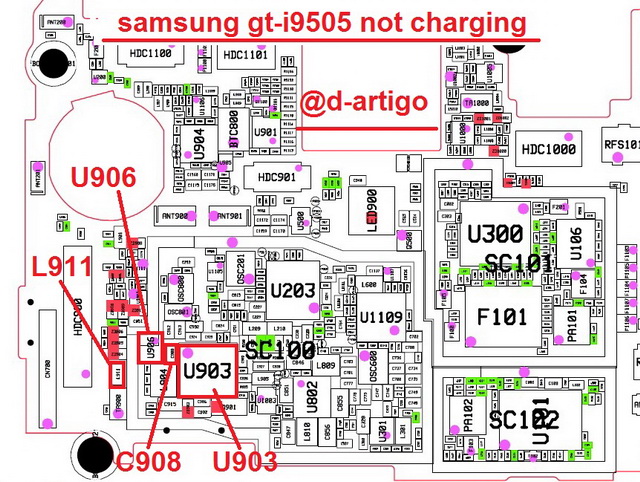
look at mother board vary carefully if there is any rust or carbon and water damage or may any component is damage.if any track is missing apply jumpers as given and if any part is damage or broken then replace it with new one.
For more information and new tips and tricks about this problem solution keep visiting this page we will update it if there will be new updates.some related post are also given below you can read more about mobile phone.
Please note that although every diagram & solution posted on our website has been tested by one or more members of our team before posting,so we will not be responsible for any loss or damage, including personal injury.Use this repair solutions at your own risk.
Samsung I9505 Galaxy S4,Nokia,Charging,Solution,Jumper,Problem,Ways
Samsung I9505 Galaxy S4 Charging Solution Jumper Problem Ways No Charging Not Supported
Samsung I9505 Galaxy S4,Nokia,Charging,Charging Problem,Charging Solution,Charging Jumpers,Charging Ways
Samsung Galaxy Win I8552 Charging Solution Jumper Problem Ways Charging Not Supported
Samsung Galaxy Win I8552 Charging Solution Jumper Problem Ways Charging Not Supported
Charging problem in Samsung Galaxy Win I8552 can be due to charging pin broken damage and due to water damages.in case of charging problem mobile can not save power in battery and may it shows fake charging in it.in fake charging condition you can only see charging signe in mobile but it will not save any electricity power in it.

to sole charging problem Samsung Galaxy Win I8552 Charging Solution Jumper Problem Ways Charging Not Supported
after disassamply of mobile phone you have to do a few steps as shown in above diagram.check charging jack and its points do they hae good value if yes then change chager and check it and if charging points at mother board do not show accourate value with meter then you hae to check all parts and tracks that are given in diagram of Samsung Galaxy Win I8552.
look at mother board vary carefully if there is any rust or carbon and water damage or may any component is damage.if any track is missing apply jumpers as given and if any part is damage or broken then replace it with new one.
For more information and new tips and tricks about this problem solution keep visiting this page we will update it if there will be new updates.some related post are also given below you can read more about mobile phone.
Please note that although every diagram & solution posted on our website has been tested by one or more members of our team before posting,so we will not be responsible for any loss or damage, including personal injury.Use this repair solutions at your own risk.
Samsung Galaxy Win I8552,Nokia,Charging,Solution,Jumper,Problem,Ways
Samsung Galaxy Win I8552 Charging Solution Jumper Problem Ways No Charging Not Supported
Samsung Galaxy Win I8552,Nokia,Charging,Charging Problem,Charging Solution,Charging Jumpers,Charging Ways
Read more »
Charging problem in Samsung Galaxy Win I8552 can be due to charging pin broken damage and due to water damages.in case of charging problem mobile can not save power in battery and may it shows fake charging in it.in fake charging condition you can only see charging signe in mobile but it will not save any electricity power in it.
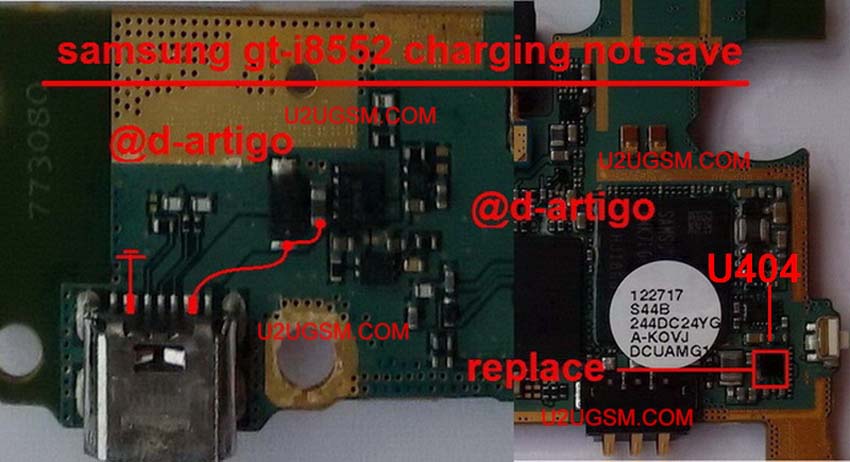
to sole charging problem Samsung Galaxy Win I8552 Charging Solution Jumper Problem Ways Charging Not Supported
after disassamply of mobile phone you have to do a few steps as shown in above diagram.check charging jack and its points do they hae good value if yes then change chager and check it and if charging points at mother board do not show accourate value with meter then you hae to check all parts and tracks that are given in diagram of Samsung Galaxy Win I8552.
look at mother board vary carefully if there is any rust or carbon and water damage or may any component is damage.if any track is missing apply jumpers as given and if any part is damage or broken then replace it with new one.
For more information and new tips and tricks about this problem solution keep visiting this page we will update it if there will be new updates.some related post are also given below you can read more about mobile phone.
Please note that although every diagram & solution posted on our website has been tested by one or more members of our team before posting,so we will not be responsible for any loss or damage, including personal injury.Use this repair solutions at your own risk.
Samsung Galaxy Win I8552,Nokia,Charging,Solution,Jumper,Problem,Ways
Samsung Galaxy Win I8552 Charging Solution Jumper Problem Ways No Charging Not Supported
Samsung Galaxy Win I8552,Nokia,Charging,Charging Problem,Charging Solution,Charging Jumpers,Charging Ways
Samsung Galaxy S5 A500F Charging Solution Jumper Problem Ways Charging Not Supported
Samsung Galaxy S5 A500F Charging Solution Jumper Problem Ways Charging Not Supported
Charging problem in Samsung Galaxy S5 A500F can be due to charging pin broken damage and due to water damages.in case of charging problem mobile can not save power in battery and may it shows fake charging in it.in fake charging condition you can only see charging signe in mobile but it will not save any electricity power in it.

to sole charging problem Samsung Galaxy S5 A500F Charging Solution Jumper Problem Ways Charging Not Supported
after disassamply of mobile phone you have to do a few steps as shown in above diagram.check charging jack and its points do they hae good value if yes then change chager and check it and if charging points at mother board do not show accourate value with meter then you hae to check all parts and tracks that are given in diagram of Samsung Galaxy S5 A500F.
look at mother board vary carefully if there is any rust or carbon and water damage or may any component is damage.if any track is missing apply jumpers as given and if any part is damage or broken then replace it with new one.
For more information and new tips and tricks about this problem solution keep visiting this page we will update it if there will be new updates.some related post are also given below you can read more about mobile phone.
Please note that although every diagram & solution posted on our website has been tested by one or more members of our team before posting,so we will not be responsible for any loss or damage, including personal injury.Use this repair solutions at your own risk.
Samsung Galaxy S5 A500F,Nokia,Charging,Solution,Jumper,Problem,Ways
Samsung Galaxy S5 A500F Charging Solution Jumper Problem Ways No Charging Not Supported
Samsung Galaxy S5 A500F,Nokia,Charging,Charging Problem,Charging Solution,Charging Jumpers,Charging Ways
Read more »
Charging problem in Samsung Galaxy S5 A500F can be due to charging pin broken damage and due to water damages.in case of charging problem mobile can not save power in battery and may it shows fake charging in it.in fake charging condition you can only see charging signe in mobile but it will not save any electricity power in it.
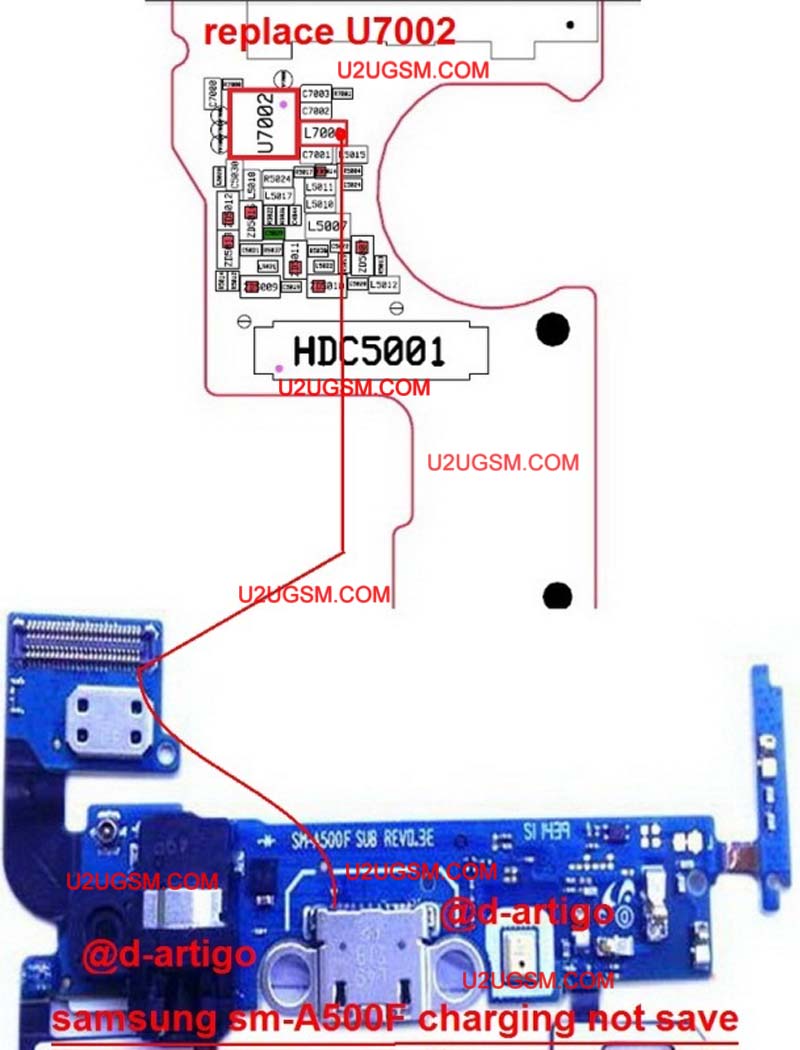
to sole charging problem Samsung Galaxy S5 A500F Charging Solution Jumper Problem Ways Charging Not Supported
after disassamply of mobile phone you have to do a few steps as shown in above diagram.check charging jack and its points do they hae good value if yes then change chager and check it and if charging points at mother board do not show accourate value with meter then you hae to check all parts and tracks that are given in diagram of Samsung Galaxy S5 A500F.
look at mother board vary carefully if there is any rust or carbon and water damage or may any component is damage.if any track is missing apply jumpers as given and if any part is damage or broken then replace it with new one.
For more information and new tips and tricks about this problem solution keep visiting this page we will update it if there will be new updates.some related post are also given below you can read more about mobile phone.
Please note that although every diagram & solution posted on our website has been tested by one or more members of our team before posting,so we will not be responsible for any loss or damage, including personal injury.Use this repair solutions at your own risk.
Samsung Galaxy S5 A500F,Nokia,Charging,Solution,Jumper,Problem,Ways
Samsung Galaxy S5 A500F Charging Solution Jumper Problem Ways No Charging Not Supported
Samsung Galaxy S5 A500F,Nokia,Charging,Charging Problem,Charging Solution,Charging Jumpers,Charging Ways
Samsung Galaxy Note II N7100 Charging Solution Jumper Problem Ways Charging Not Supported
Samsung Galaxy Note II N7100 Charging Solution Jumper Problem Ways Charging Not Supported
Charging problem in Samsung Galaxy Note II N7100 can be due to charging pin broken damage and due to water damages.in case of charging problem mobile can not save power in battery and may it shows fake charging in it.in fake charging condition you can only see charging signe in mobile but it will not save any electricity power in it.

to sole charging problem Samsung Galaxy Note II N7100 Charging Solution Jumper Problem Ways Charging Not Supported
after disassamply of mobile phone you have to do a few steps as shown in above diagram.check charging jack and its points do they hae good value if yes then change chager and check it and if charging points at mother board do not show accourate value with meter then you hae to check all parts and tracks that are given in diagram of Samsung Galaxy Note II N7100.
look at mother board vary carefully if there is any rust or carbon and water damage or may any component is damage.if any track is missing apply jumpers as given and if any part is damage or broken then replace it with new one.
For more information and new tips and tricks about this problem solution keep visiting this page we will update it if there will be new updates.some related post are also given below you can read more about mobile phone.
Please note that although every diagram & solution posted on our website has been tested by one or more members of our team before posting,so we will not be responsible for any loss or damage, including personal injury.Use this repair solutions at your own risk.
Samsung Galaxy Note II N7100,Nokia,Charging,Solution,Jumper,Problem,Ways
Samsung Galaxy Note II N7100 Charging Solution Jumper Problem Ways No Charging Not Supported
Samsung Galaxy Note II N7100,Nokia,Charging,Charging Problem,Charging Solution,Charging Jumpers,Charging Ways
Read more »
Charging problem in Samsung Galaxy Note II N7100 can be due to charging pin broken damage and due to water damages.in case of charging problem mobile can not save power in battery and may it shows fake charging in it.in fake charging condition you can only see charging signe in mobile but it will not save any electricity power in it.
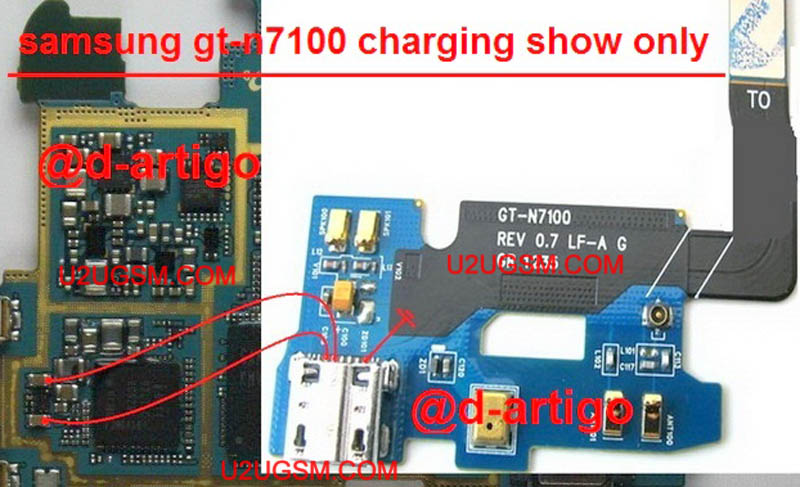
to sole charging problem Samsung Galaxy Note II N7100 Charging Solution Jumper Problem Ways Charging Not Supported
after disassamply of mobile phone you have to do a few steps as shown in above diagram.check charging jack and its points do they hae good value if yes then change chager and check it and if charging points at mother board do not show accourate value with meter then you hae to check all parts and tracks that are given in diagram of Samsung Galaxy Note II N7100.
look at mother board vary carefully if there is any rust or carbon and water damage or may any component is damage.if any track is missing apply jumpers as given and if any part is damage or broken then replace it with new one.
For more information and new tips and tricks about this problem solution keep visiting this page we will update it if there will be new updates.some related post are also given below you can read more about mobile phone.
Please note that although every diagram & solution posted on our website has been tested by one or more members of our team before posting,so we will not be responsible for any loss or damage, including personal injury.Use this repair solutions at your own risk.
Samsung Galaxy Note II N7100,Nokia,Charging,Solution,Jumper,Problem,Ways
Samsung Galaxy Note II N7100 Charging Solution Jumper Problem Ways No Charging Not Supported
Samsung Galaxy Note II N7100,Nokia,Charging,Charging Problem,Charging Solution,Charging Jumpers,Charging Ways
Nokia XL Charging Solution Jumper Problem Ways Charging Not Supported
Nokia XL Charging Solution Jumper Problem Ways Charging Not Supported
Charging problem in Nokia XL can be due to charging pin broken damage and due to water damages.in case of charging problem mobile can not save power in battery and may it shows fake charging in it.in fake charging condition you can only see charging signe in mobile but it will not save any electricity power in it.

to sole charging problem Nokia XL Charging Solution Jumper Problem Ways Charging Not Supported
after disassamply of mobile phone you have to do a few steps as shown in above diagram.check charging jack and its points do they hae good value if yes then change chager and check it and if charging points at mother board do not show accourate value with meter then you hae to check all parts and tracks that are given in diagram of Nokia XL.
look at mother board vary carefully if there is any rust or carbon and water damage or may any component is damage.if any track is missing apply jumpers as given and if any part is damage or broken then replace it with new one.
For more information and new tips and tricks about this problem solution keep visiting this page we will update it if there will be new updates.some related post are also given below you can read more about mobile phone.
Please note that although every diagram & solution posted on our website has been tested by one or more members of our team before posting,so we will not be responsible for any loss or damage, including personal injury.Use this repair solutions at your own risk.
Nokia XL,Nokia,Charging,Solution,Jumper,Problem,Ways
Nokia XL Charging Solution Jumper Problem Ways No Charging Not Supported
Nokia XL,Nokia,Charging,Charging Problem,Charging Solution,Charging Jumpers,Charging Ways
Read more »
Charging problem in Nokia XL can be due to charging pin broken damage and due to water damages.in case of charging problem mobile can not save power in battery and may it shows fake charging in it.in fake charging condition you can only see charging signe in mobile but it will not save any electricity power in it.
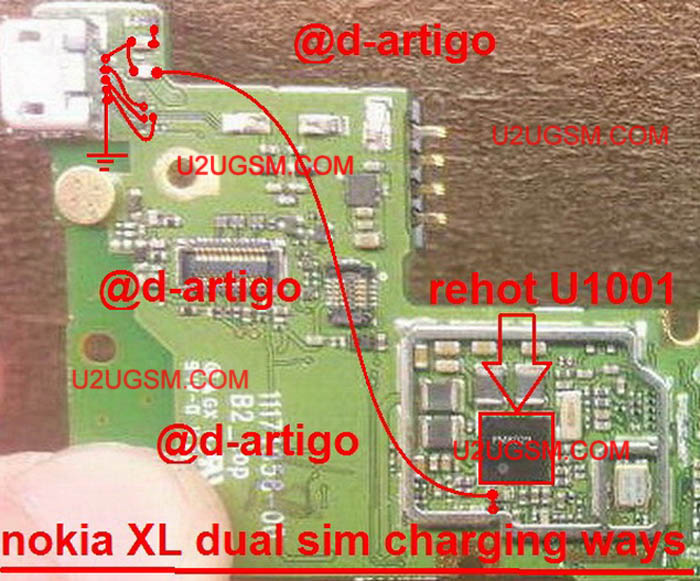
to sole charging problem Nokia XL Charging Solution Jumper Problem Ways Charging Not Supported
after disassamply of mobile phone you have to do a few steps as shown in above diagram.check charging jack and its points do they hae good value if yes then change chager and check it and if charging points at mother board do not show accourate value with meter then you hae to check all parts and tracks that are given in diagram of Nokia XL.
look at mother board vary carefully if there is any rust or carbon and water damage or may any component is damage.if any track is missing apply jumpers as given and if any part is damage or broken then replace it with new one.
For more information and new tips and tricks about this problem solution keep visiting this page we will update it if there will be new updates.some related post are also given below you can read more about mobile phone.
Please note that although every diagram & solution posted on our website has been tested by one or more members of our team before posting,so we will not be responsible for any loss or damage, including personal injury.Use this repair solutions at your own risk.
Nokia XL,Nokia,Charging,Solution,Jumper,Problem,Ways
Nokia XL Charging Solution Jumper Problem Ways No Charging Not Supported
Nokia XL,Nokia,Charging,Charging Problem,Charging Solution,Charging Jumpers,Charging Ways
Samsung Galaxy Pocket S5300 Charging Solution Jumper Problem Ways Charging Not Supported
Samsung Galaxy Pocket S5300 Charging Solution Jumper Problem Ways Charging Not Supported
Charging problem in Samsung Galaxy Pocket S5300 can be due to charging pin broken damage and due to water damages.in case of charging problem mobile can not save power in battery and may it shows fake charging in it.in fake charging condition you can only see charging signe in mobile but it will not save any electricity power in it.

to sole charging problem Samsung Galaxy Pocket S5300 Charging Solution Jumper Problem Ways Charging Not Supported
after disassamply of mobile phone you have to do a few steps as shown in above diagram.check charging jack and its points do they hae good value if yes then change chager and check it and if charging points at mother board do not show accourate value with meter then you hae to check all parts and tracks that are given in diagram of Samsung Galaxy Pocket S5300.
look at mother board vary carefully if there is any rust or carbon and water damage or may any component is damage.if any track is missing apply jumpers as given and if any part is damage or broken then replace it with new one.
For more information and new tips and tricks about this problem solution keep visiting this page we will update it if there will be new updates.some related post are also given below you can read more about mobile phone.
Please note that although every diagram & solution posted on our website has been tested by one or more members of our team before posting,so we will not be responsible for any loss or damage, including personal injury.Use this repair solutions at your own risk.
Samsung Galaxy Pocket S5300,Nokia,Charging,Solution,Jumper,Problem,Ways
Samsung Galaxy Pocket S5300 Charging Solution Jumper Problem Ways No Charging Not Supported
Samsung Galaxy Pocket S5300,Nokia,Charging,Charging Problem,Charging Solution,Charging Jumpers,Charging Ways
Read more »
Charging problem in Samsung Galaxy Pocket S5300 can be due to charging pin broken damage and due to water damages.in case of charging problem mobile can not save power in battery and may it shows fake charging in it.in fake charging condition you can only see charging signe in mobile but it will not save any electricity power in it.

to sole charging problem Samsung Galaxy Pocket S5300 Charging Solution Jumper Problem Ways Charging Not Supported
after disassamply of mobile phone you have to do a few steps as shown in above diagram.check charging jack and its points do they hae good value if yes then change chager and check it and if charging points at mother board do not show accourate value with meter then you hae to check all parts and tracks that are given in diagram of Samsung Galaxy Pocket S5300.
look at mother board vary carefully if there is any rust or carbon and water damage or may any component is damage.if any track is missing apply jumpers as given and if any part is damage or broken then replace it with new one.
For more information and new tips and tricks about this problem solution keep visiting this page we will update it if there will be new updates.some related post are also given below you can read more about mobile phone.
Please note that although every diagram & solution posted on our website has been tested by one or more members of our team before posting,so we will not be responsible for any loss or damage, including personal injury.Use this repair solutions at your own risk.
Samsung Galaxy Pocket S5300,Nokia,Charging,Solution,Jumper,Problem,Ways
Samsung Galaxy Pocket S5300 Charging Solution Jumper Problem Ways No Charging Not Supported
Samsung Galaxy Pocket S5300,Nokia,Charging,Charging Problem,Charging Solution,Charging Jumpers,Charging Ways
LG T585 Charging Solution Jumper Problem Ways Charging Not Supported
LG T585 Charging Solution Jumper Problem Ways Charging Not Supported
Charging problem in LG T585 can be due to charging pin broken damage and due to water damages.in case of charging problem mobile can not save power in battery and may it shows fake charging in it.in fake charging condition you can only see charging signe in mobile but it will not save any electricity power in it.

to sole charging problem LG T585 Charging Solution Jumper Problem Ways Charging Not Supported
after disassamply of mobile phone you have to do a few steps as shown in above diagram.check charging jack and its points do they hae good value if yes then change chager and check it and if charging points at mother board do not show accourate value with meter then you hae to check all parts and tracks that are given in diagram of LG T585.
look at mother board vary carefully if there is any rust or carbon and water damage or may any component is damage.if any track is missing apply jumpers as given and if any part is damage or broken then replace it with new one.
For more information and new tips and tricks about this problem solution keep visiting this page we will update it if there will be new updates.some related post are also given below you can read more about mobile phone.
Please note that although every diagram & solution posted on our website has been tested by one or more members of our team before posting,so we will not be responsible for any loss or damage, including personal injury.Use this repair solutions at your own risk.
LG T585,Nokia,Charging,Solution,Jumper,Problem,Ways
LG T585 Charging Solution Jumper Problem Ways No Charging Not Supported
LG T585,Nokia,Charging,Charging Problem,Charging Solution,Charging Jumpers,Charging Ways
Read more »
Charging problem in LG T585 can be due to charging pin broken damage and due to water damages.in case of charging problem mobile can not save power in battery and may it shows fake charging in it.in fake charging condition you can only see charging signe in mobile but it will not save any electricity power in it.
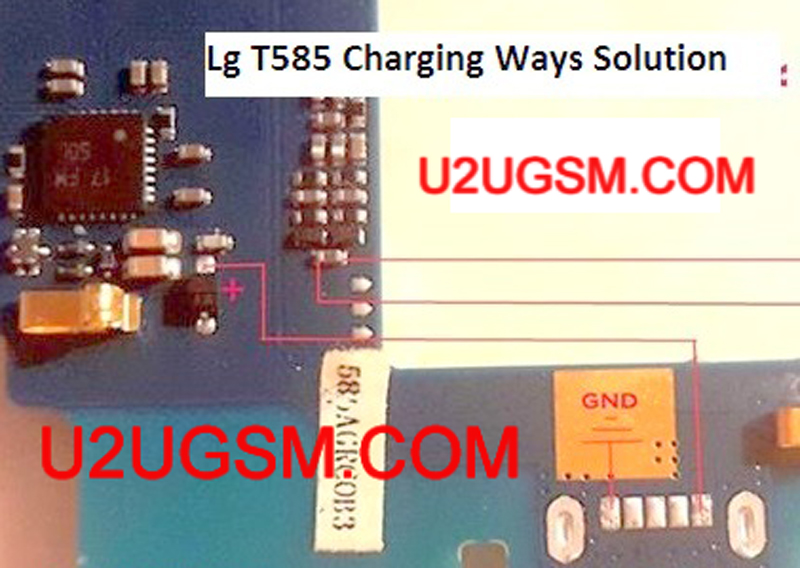
to sole charging problem LG T585 Charging Solution Jumper Problem Ways Charging Not Supported
after disassamply of mobile phone you have to do a few steps as shown in above diagram.check charging jack and its points do they hae good value if yes then change chager and check it and if charging points at mother board do not show accourate value with meter then you hae to check all parts and tracks that are given in diagram of LG T585.
look at mother board vary carefully if there is any rust or carbon and water damage or may any component is damage.if any track is missing apply jumpers as given and if any part is damage or broken then replace it with new one.
For more information and new tips and tricks about this problem solution keep visiting this page we will update it if there will be new updates.some related post are also given below you can read more about mobile phone.
Please note that although every diagram & solution posted on our website has been tested by one or more members of our team before posting,so we will not be responsible for any loss or damage, including personal injury.Use this repair solutions at your own risk.
LG T585,Nokia,Charging,Solution,Jumper,Problem,Ways
LG T585 Charging Solution Jumper Problem Ways No Charging Not Supported
LG T585,Nokia,Charging,Charging Problem,Charging Solution,Charging Jumpers,Charging Ways
Nokia Lumia 920 Charging Solution Jumper Problem Ways Charging Not Supported
Nokia Lumia 920 Charging Solution Jumper Problem Ways Charging Not Supported
Charging problem in Nokia Lumia 920 can be due to charging pin broken damage and due to water damages.in case of charging problem mobile can not save power in battery and may it shows fake charging in it.in fake charging condition you can only see charging signe in mobile but it will not save any electricity power in it.

How to solve the problem of load For Nokia Lumia 920 phone:
Nokia 920 charger problem unanswered - showing no or charging indication screen battery when the charger is plug-in.
1. Try using a loader work.
2. Check / replace the charging connector pin for possible damaged, bent or oxidation accumulate.
3. Clean the contact load pin terminal on the PCB board.
4. Check the fuse of the coil and the diode, replace if damaged.
Nokia E63 False charging problem - showing or displaying an indication of charging, but the charging voltage is not stored or saved to the battery.
1. Try replacing the battery or use another working phone.
2. Check and clean the battery connector.
3. Reheat, rework or replacement BETTY IC.
4. If the problem persists, try to rework the power IC.
Nokia Lumia 920 charger not supported problem - showing a "Charger not supported error" on the screen when the battery is connected.
to sole charging problem Nokia Lumia 920 Charging Solution Jumper Problem Ways Charging Not Supported
after disassamply of mobile phone you have to do a few steps as shown in above diagram.check charging jack and its points do they hae good value if yes then change chager and check it and if charging points at mother board do not show accourate value with meter then you hae to check all parts and tracks that are given in diagram of Nokia Lumia 920.
look at mother board vary carefully if there is any rust or carbon and water damage or may any component is damage.if any track is missing apply jumpers as given and if any part is damage or broken then replace it with new one.
For more information and new tips and tricks about this problem solution keep visiting this page we will update it if there will be new updates.some related post are also given below you can read more about mobile phone.
Please note that although every diagram & solution posted on our website has been tested by one or more members of our team before posting,so we will not be responsible for any loss or damage, including personal injury.Use this repair solutions at your own risk.
Nokia Lumia 920,Nokia,Charging,Solution,Jumper,Problem,Ways
Nokia Lumia 920 Charging Solution Jumper Problem Ways No Charging Not Supported
Nokia Lumia 920,Nokia,Charging,Charging Problem,Charging Solution,Charging Jumpers,Charging Ways
Read more »
Charging problem in Nokia Lumia 920 can be due to charging pin broken damage and due to water damages.in case of charging problem mobile can not save power in battery and may it shows fake charging in it.in fake charging condition you can only see charging signe in mobile but it will not save any electricity power in it.

How to solve the problem of load For Nokia Lumia 920 phone:
Nokia 920 charger problem unanswered - showing no or charging indication screen battery when the charger is plug-in.
1. Try using a loader work.
2. Check / replace the charging connector pin for possible damaged, bent or oxidation accumulate.
3. Clean the contact load pin terminal on the PCB board.
4. Check the fuse of the coil and the diode, replace if damaged.
Nokia E63 False charging problem - showing or displaying an indication of charging, but the charging voltage is not stored or saved to the battery.
1. Try replacing the battery or use another working phone.
2. Check and clean the battery connector.
3. Reheat, rework or replacement BETTY IC.
4. If the problem persists, try to rework the power IC.
Nokia Lumia 920 charger not supported problem - showing a "Charger not supported error" on the screen when the battery is connected.
to sole charging problem Nokia Lumia 920 Charging Solution Jumper Problem Ways Charging Not Supported
after disassamply of mobile phone you have to do a few steps as shown in above diagram.check charging jack and its points do they hae good value if yes then change chager and check it and if charging points at mother board do not show accourate value with meter then you hae to check all parts and tracks that are given in diagram of Nokia Lumia 920.
look at mother board vary carefully if there is any rust or carbon and water damage or may any component is damage.if any track is missing apply jumpers as given and if any part is damage or broken then replace it with new one.
For more information and new tips and tricks about this problem solution keep visiting this page we will update it if there will be new updates.some related post are also given below you can read more about mobile phone.
Please note that although every diagram & solution posted on our website has been tested by one or more members of our team before posting,so we will not be responsible for any loss or damage, including personal injury.Use this repair solutions at your own risk.
Nokia Lumia 920,Nokia,Charging,Solution,Jumper,Problem,Ways
Nokia Lumia 920 Charging Solution Jumper Problem Ways No Charging Not Supported
Nokia Lumia 920,Nokia,Charging,Charging Problem,Charging Solution,Charging Jumpers,Charging Ways
Monday, August 10, 2015
nokia c2-01 charger not supported problem
nokia c2-01 charger not supported problem
C2-01 charging solution
nokia c2-01 fake charging
nokia c2-01 charger
n c2 charging solution
nokia c2 01 charging problam
nokia c2 w not charging solution
nokia 300 do not charge
nokia c2-01 charging problems
nokia c2-01charging daigram
www nokia c2 charging soliotion

If it shows notification Charger not supported it can be cause of Resistance 47K.
If notification shows not charging it can be due to missing values.So after dis assembly of Nokia C2-01 check charging pin base. Check charging points on the mother board.
Read more »
C2-01 charging solution
nokia c2-01 fake charging
nokia c2-01 charger
n c2 charging solution
nokia c2 01 charging problam
nokia c2 w not charging solution
nokia 300 do not charge
nokia c2-01 charging problems
nokia c2-01charging daigram
www nokia c2 charging soliotion

If it shows notification Charger not supported it can be cause of Resistance 47K.
If notification shows not charging it can be due to missing values.So after dis assembly of Nokia C2-01 check charging pin base. Check charging points on the mother board.
Subscribe to:
Posts (Atom)