Showing posts with label Powerr Problem. Show all posts
Showing posts with label Powerr Problem. Show all posts
Tuesday, August 11, 2015
Nokia 111 Power Switch Button Ways Jumpers Solution
nokia 111 power on ways , nokia 111 on off switch jumper , nokia 111 power switch ways , 111 on off switch jumper , nokia 111 power switch , nokia 111 power switch solution , nokia 111on off problem , nokia 111 on off switch problem , nokia 111-01 power switch ways ,

power switch 111 , nokia 111-1 power ways , 111 power way , nokia 111power switch solution , nokia 111 on off ways , nokia 111 power switch legs way , problem on-off switch on n71 , 111 switch ways , 111 power switch jumper , 111 siviç yolu , 111-1 switch ways , nokia 111 power switch ways solution , nokia 111 on off switch ways , nokia 111 on off switch way
Read more »

power switch 111 , nokia 111-1 power ways , 111 power way , nokia 111power switch solution , nokia 111 on off ways , nokia 111 power switch legs way , problem on-off switch on n71 , 111 switch ways , 111 power switch jumper , 111 siviç yolu , 111-1 switch ways , nokia 111 power switch ways solution , nokia 111 on off switch ways , nokia 111 on off switch way

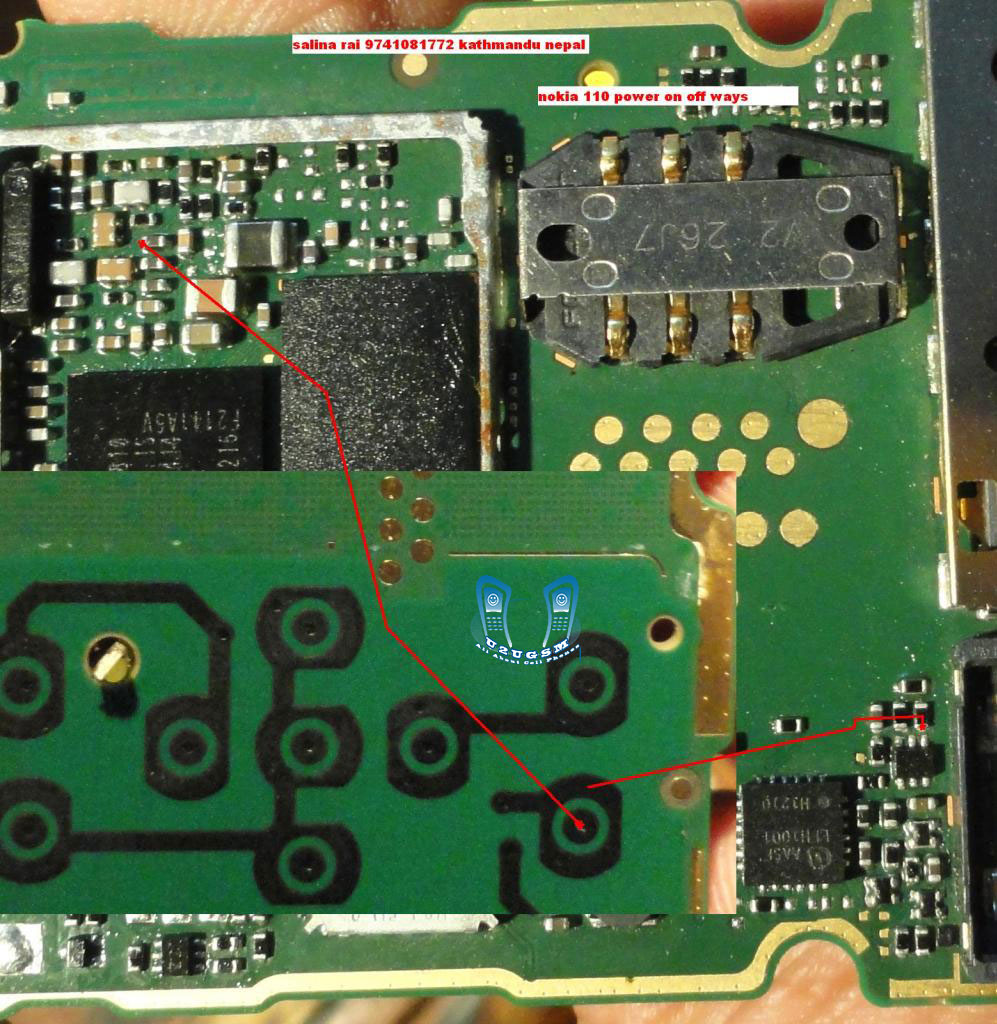
Nokia 110 Power Switch Button Ways Jumpers Solution
nokia 110 not turning on , nokia 110 power key , nokia 110 power button not working,

nokia 110 power button ways, nokia 110 01 power button, nokia 110 will not turn on, Nokia 110 power ways, nokia 110 01 power button ways, 110 turn on problem, nokia 110-01 on-off switch solution
Read more »
nokia 110 power button ways, nokia 110 01 power button, nokia 110 will not turn on, Nokia 110 power ways, nokia 110 01 power button ways, 110 turn on problem, nokia 110-01 on-off switch solution
Samsung I8190 Galaxy S III mini Power On Off Button Ways
Samsung I8190 Galaxy S III mini Power On Off Button Ways
Here is the solution for Samsung I8190 Galaxy S III mini key not work on / off problem. This solution may help fix if the phone shows charging indication or charging icon when the battery charger is plug-in, but could not or can not turn it on.
Samsung I8190 Galaxy S III mini Power On Off Key Jumper, Track, Ways
Samsung I8190 Galaxy S III mini On

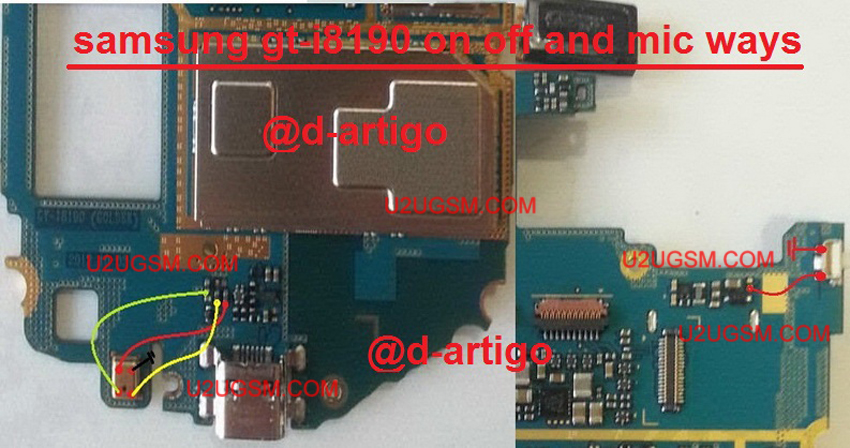
Samsung I8190 Galaxy S III mini In the power ON-OFF, other than it is in the matrix keyboard flex is also connected to the keyboard filter IC. The solution below shows the connection line paths of the power key, this is useful without changing the filter IC and this can be used without having to connect the power key filter IC.
Just refer to the solution given below and track said main power line roads.
Only manage to apply a jumper wire in places where the Samsung I8190 Galaxy S III mini connecting said power key. This can help change without compromising the IC filter matrix or keyboard flex.
Samsung I8190 Galaxy S III mini,Nokia,Power Button,Power Key,Power Switch,On Off Button, On Off Switch, Powerr Problem
Read more »
Here is the solution for Samsung I8190 Galaxy S III mini key not work on / off problem. This solution may help fix if the phone shows charging indication or charging icon when the battery charger is plug-in, but could not or can not turn it on.
Samsung I8190 Galaxy S III mini Power On Off Key Jumper, Track, Ways
Samsung I8190 Galaxy S III mini On
Samsung I8190 Galaxy S III mini In the power ON-OFF, other than it is in the matrix keyboard flex is also connected to the keyboard filter IC. The solution below shows the connection line paths of the power key, this is useful without changing the filter IC and this can be used without having to connect the power key filter IC.
Just refer to the solution given below and track said main power line roads.
Only manage to apply a jumper wire in places where the Samsung I8190 Galaxy S III mini connecting said power key. This can help change without compromising the IC filter matrix or keyboard flex.
Samsung I8190 Galaxy S III mini,Nokia,Power Button,Power Key,Power Switch,On Off Button, On Off Switch, Powerr Problem
nokia 1200 power on-off ways
1200 switch not way ways, 1200 power sollution, nokia 1200 power switch jumper, how to nokia 1200 on off without power key, nokia 1200 power problem solution, nokia 1200 power key not work problam, nokia1200 power key jumper solution, nokia 1208 power button not working, nokia 1200 power on of switch, nokia 1200 power button not working, nokia 1200 onoff switch ways

nokia 1200 power on-off ways nokia 1200 on off switch jumper , nokia 1200 powar on off , nokia 1200 power key jumper , nokia 1200 power problem , nokia 1200 power bottom , nokia 1200 power on jumper, nokia 1200 on off switch ways, nokia 1200 power onoff jumper, nokia 1200 switch on problam, nokia 1200 power switch way, nokia 1200 switch on problem, nokia1200 on and off ,
Read more »
nokia 1200 power on-off ways nokia 1200 on off switch jumper , nokia 1200 powar on off , nokia 1200 power key jumper , nokia 1200 power problem , nokia 1200 power bottom , nokia 1200 power on jumper, nokia 1200 on off switch ways, nokia 1200 power onoff jumper, nokia 1200 switch on problam, nokia 1200 power switch way, nokia 1200 switch on problem, nokia1200 on and off ,
Samsung Galaxy Y S5360 Power Problem Solution
I have a samsung s5360 no power on L400 & L401
but on power supply it show me when I connect it show me a current of 0.16A without pressing power key & when I press power key no change of 0.16A
I have change power ic MAX8986 nothing did change
can some one give me a solution.......please
first try to check the battery connector his ways, especially track bsi
the second check or replace the C417, C418 and C419
rehot or replace U400 ... open its schematic diagram

samsung gt-s5360 power on
please check or replace the voltage Vbat ic PAM400
ic pam400 you can get the samsung:
1. gt-s5380d = u500
2. gt-s6102 = u401
3. gt-S5363 = pam400
4 gt-s7250 = u501
see picture above.
Read more »
but on power supply it show me when I connect it show me a current of 0.16A without pressing power key & when I press power key no change of 0.16A
I have change power ic MAX8986 nothing did change
can some one give me a solution.......please
first try to check the battery connector his ways, especially track bsi
the second check or replace the C417, C418 and C419
rehot or replace U400 ... open its schematic diagram

samsung gt-s5360 power on
please check or replace the voltage Vbat ic PAM400
ic pam400 you can get the samsung:
1. gt-s5380d = u500
2. gt-s6102 = u401
3. gt-S5363 = pam400
4 gt-s7250 = u501
see picture above.
Samsung Galaxy Core II Power On Off Button Ways
Samsung Galaxy Core II Power On Off Button Ways
Here is the solution for Samsung Galaxy Core II key not work on / off problem. This solution may help fix if the phone shows charging indication or charging icon when the battery charger is plug-in, but could not or can not turn it on.
Samsung Galaxy Core II Power On Off Key Jumper, Track, Ways
Samsung Galaxy Core II On

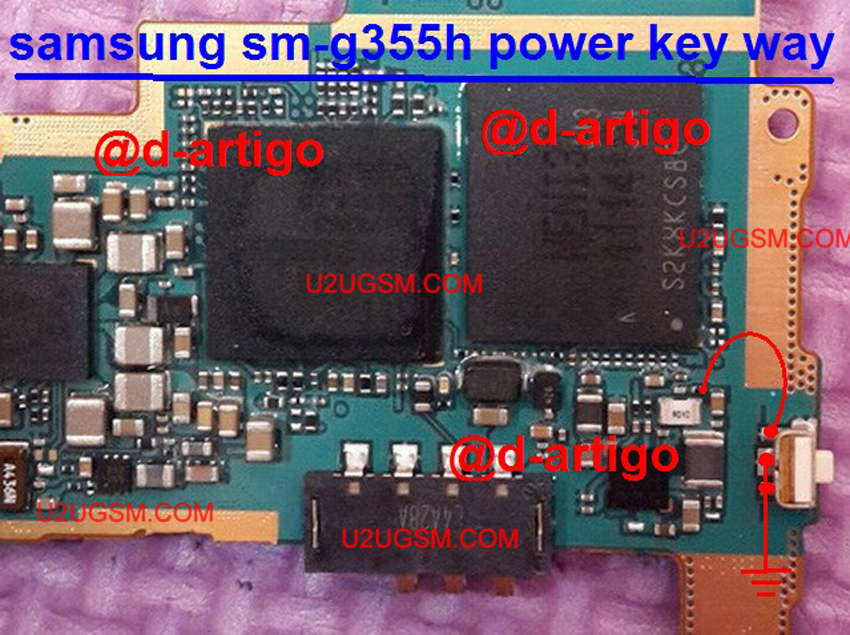
Samsung Galaxy Core II In the power ON-OFF, other than it is in the matrix keyboard flex is also connected to the keyboard filter IC. The solution below shows the connection line paths of the power key, this is useful without changing the filter IC and this can be used without having to connect the power key filter IC.
Just refer to the solution given below and track said main power line roads.
Only manage to apply a jumper wire in places where the Samsung Galaxy Core II connecting said power key. This can help change without compromising the IC filter matrix or keyboard flex.
Samsung Galaxy Core II,Nokia,Power Button,Power Key,Power Switch,On Off Button, On Off Switch, Powerr Problem
Read more »
Here is the solution for Samsung Galaxy Core II key not work on / off problem. This solution may help fix if the phone shows charging indication or charging icon when the battery charger is plug-in, but could not or can not turn it on.
Samsung Galaxy Core II Power On Off Key Jumper, Track, Ways
Samsung Galaxy Core II On
Samsung Galaxy Core II In the power ON-OFF, other than it is in the matrix keyboard flex is also connected to the keyboard filter IC. The solution below shows the connection line paths of the power key, this is useful without changing the filter IC and this can be used without having to connect the power key filter IC.
Just refer to the solution given below and track said main power line roads.
Only manage to apply a jumper wire in places where the Samsung Galaxy Core II connecting said power key. This can help change without compromising the IC filter matrix or keyboard flex.
Samsung Galaxy Core II,Nokia,Power Button,Power Key,Power Switch,On Off Button, On Off Switch, Powerr Problem
Samsung Galaxy Note II N7100 Power On Off Button Ways
Samsung Galaxy Note II N7100 Power On Off Button Ways
Here is the solution for Samsung Galaxy Note II N7100 key not work on / off problem. This solution may help fix if the phone shows charging indication or charging icon when the battery charger is plug-in, but could not or can not turn it on.
Samsung Galaxy Note II N7100 Power On Off Key Jumper, Track, Ways
Samsung Galaxy Note II N7100 On

Samsung Galaxy Note II N7100 In the power ON-OFF, other than it is in the matrix keyboard flex is also connected to the keyboard filter IC. The solution below shows the connection line paths of the power key, this is useful without changing the filter IC and this can be used without having to connect the power key filter IC.
Just refer to the solution given below and track said main power line roads.
Only manage to apply a jumper wire in places where the Samsung Galaxy Note II N7100 connecting said power key. This can help change without compromising the IC filter matrix or keyboard flex.
Samsung Galaxy Note II N7100,Nokia,Power Button,Power Key,Power Switch,On Off Button, On Off Switch, Powerr Problem
Read more »
Here is the solution for Samsung Galaxy Note II N7100 key not work on / off problem. This solution may help fix if the phone shows charging indication or charging icon when the battery charger is plug-in, but could not or can not turn it on.
Samsung Galaxy Note II N7100 Power On Off Key Jumper, Track, Ways
Samsung Galaxy Note II N7100 On

Samsung Galaxy Note II N7100 In the power ON-OFF, other than it is in the matrix keyboard flex is also connected to the keyboard filter IC. The solution below shows the connection line paths of the power key, this is useful without changing the filter IC and this can be used without having to connect the power key filter IC.
Just refer to the solution given below and track said main power line roads.
Only manage to apply a jumper wire in places where the Samsung Galaxy Note II N7100 connecting said power key. This can help change without compromising the IC filter matrix or keyboard flex.
Samsung Galaxy Note II N7100,Nokia,Power Button,Power Key,Power Switch,On Off Button, On Off Switch, Powerr Problem
Samsung Galaxy S2 Power On Off Button Ways
Samsung Galaxy S2 Power On Off Button Ways
Here is the solution for Samsung Galaxy S2 key not work on / off problem. This solution may help fix if the phone shows charging indication or charging icon when the battery charger is plug-in, but could not or can not turn it on.
Samsung Galaxy S2 Power On Off Key Jumper, Track, Ways
Samsung Galaxy S2 On

Samsung Galaxy S2 In the power ON-OFF, other than it is in the matrix keyboard flex is also connected to the keyboard filter IC. The solution below shows the connection line paths of the power key, this is useful without changing the filter IC and this can be used without having to connect the power key filter IC.
Just refer to the solution given below and track said main power line roads.
Only manage to apply a jumper wire in places where the Samsung Galaxy S2 connecting said power key. This can help change without compromising the IC filter matrix or keyboard flex.
Samsung Galaxy S2,Nokia,Power Button,Power Key,Power Switch,On Off Button, On Off Switch, Powerr Problem
Read more »
Here is the solution for Samsung Galaxy S2 key not work on / off problem. This solution may help fix if the phone shows charging indication or charging icon when the battery charger is plug-in, but could not or can not turn it on.
Samsung Galaxy S2 Power On Off Key Jumper, Track, Ways
Samsung Galaxy S2 On

Samsung Galaxy S2 In the power ON-OFF, other than it is in the matrix keyboard flex is also connected to the keyboard filter IC. The solution below shows the connection line paths of the power key, this is useful without changing the filter IC and this can be used without having to connect the power key filter IC.
Just refer to the solution given below and track said main power line roads.
Only manage to apply a jumper wire in places where the Samsung Galaxy S2 connecting said power key. This can help change without compromising the IC filter matrix or keyboard flex.
Samsung Galaxy S2,Nokia,Power Button,Power Key,Power Switch,On Off Button, On Off Switch, Powerr Problem
Nokia Asha 501 Power On Off Button Ways
Nokia Asha 501 Power On Off Button Ways
Here is the solution for Nokia Asha 501 key not work on / off problem. This solution may help fix if the phone shows charging indication or charging icon when the battery charger is plug-in, but could not or can not turn it on.
Nokia Asha 501 Power On Off Key Jumper, Track, Ways
Nokia Asha 501 On

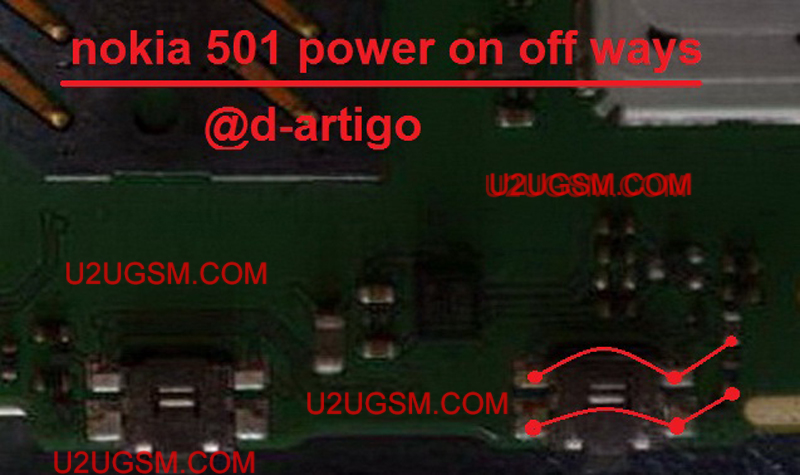
Nokia Asha 501 In the power ON-OFF, other than it is in the matrix keyboard flex is also connected to the keyboard filter IC. The solution below shows the connection line paths of the power key, this is useful without changing the filter IC and this can be used without having to connect the power key filter IC.
Just refer to the solution given below and track said main power line roads.
Only manage to apply a jumper wire in places where the Nokia Asha 501 connecting said power key. This can help change without compromising the IC filter matrix or keyboard flex.
Nokia Asha 501,Nokia,Power Button,Power Key,Power Switch,On Off Button, On Off Switch, Powerr Problem
Read more »
Here is the solution for Nokia Asha 501 key not work on / off problem. This solution may help fix if the phone shows charging indication or charging icon when the battery charger is plug-in, but could not or can not turn it on.
Nokia Asha 501 Power On Off Key Jumper, Track, Ways
Nokia Asha 501 On
Nokia Asha 501 In the power ON-OFF, other than it is in the matrix keyboard flex is also connected to the keyboard filter IC. The solution below shows the connection line paths of the power key, this is useful without changing the filter IC and this can be used without having to connect the power key filter IC.
Just refer to the solution given below and track said main power line roads.
Only manage to apply a jumper wire in places where the Nokia Asha 501 connecting said power key. This can help change without compromising the IC filter matrix or keyboard flex.
Nokia Asha 501,Nokia,Power Button,Power Key,Power Switch,On Off Button, On Off Switch, Powerr Problem
Samsung Galaxy Note N7000 Dead During Charging
Samsung Galaxy Note N7000 Dead During Charging.
One of over friend has sent us the diagrams bellow to solve Samsung Galaxy Note N7000 dead during charging. So in this situation we can do a basic troubleshooting to solve the dead problem of Samsung Galaxy Note N7000.

In basic steps we can change the battery and charger to diagnostic the problems in it. Then check out the charging base and if you find out the burn charging base then replace it.

After disassemble of the Samsung Galaxy Note N7000 check out all parts that are burn or damage. Specially check out the parts shown in diagrams above and replace or check these parts to solve Samsung Galaxy Note N7000 dead problem no power problems.
Read more »
One of over friend has sent us the diagrams bellow to solve Samsung Galaxy Note N7000 dead during charging. So in this situation we can do a basic troubleshooting to solve the dead problem of Samsung Galaxy Note N7000.

In basic steps we can change the battery and charger to diagnostic the problems in it. Then check out the charging base and if you find out the burn charging base then replace it.

After disassemble of the Samsung Galaxy Note N7000 check out all parts that are burn or damage. Specially check out the parts shown in diagrams above and replace or check these parts to solve Samsung Galaxy Note N7000 dead problem no power problems.
Samsung Galaxy Note II N7100 Power Button Problem Solution Ways
Samsung Galaxy Note II N7100 Power On Off Button Ways
Here is the solution for Samsung Galaxy Note II N7100 key not work on / off problem. This solution may help fix if the phone shows charging indication or charging icon when the battery charger is plug-in, but could not or can not turn it on.
Samsung Galaxy Note II N7100 Power On Off Key Jumper, Track, Ways
Samsung Galaxy Note II N7100 On

Samsung Galaxy Note II N7100 In the power ON-OFF, other than it is in the matrix keyboard flex is also connected to the keyboard filter IC. The solution below shows the connection line paths of the power key, this is useful without changing the filter IC and this can be used without having to connect the power key filter IC.
Just refer to the solution given below and track said main power line roads.
Only manage to apply a jumper wire in places where the Samsung Galaxy Note II N7100 connecting said power key. This can help change without compromising the IC filter matrix or keyboard flex.
Samsung Galaxy Note II N7100,Nokia,Power Button,Power Key,Power Switch,On Off Button, On Off Switch, Powerr Problem
Read more »
Here is the solution for Samsung Galaxy Note II N7100 key not work on / off problem. This solution may help fix if the phone shows charging indication or charging icon when the battery charger is plug-in, but could not or can not turn it on.
Samsung Galaxy Note II N7100 Power On Off Key Jumper, Track, Ways
Samsung Galaxy Note II N7100 On

Samsung Galaxy Note II N7100 In the power ON-OFF, other than it is in the matrix keyboard flex is also connected to the keyboard filter IC. The solution below shows the connection line paths of the power key, this is useful without changing the filter IC and this can be used without having to connect the power key filter IC.
Just refer to the solution given below and track said main power line roads.
Only manage to apply a jumper wire in places where the Samsung Galaxy Note II N7100 connecting said power key. This can help change without compromising the IC filter matrix or keyboard flex.
Samsung Galaxy Note II N7100,Nokia,Power Button,Power Key,Power Switch,On Off Button, On Off Switch, Powerr Problem
Samsung Galaxy Tab 3 SM-T211 Power On Off Button Ways
Samsung Galaxy Tab 3 SM-T211 Power On Off Button Ways
Here is the solution for Samsung Galaxy Tab 3 SM-T211 key not work on / off problem. This solution may help fix if the phone shows charging indication or charging icon when the battery charger is plug-in, but could not or can not turn it on.

Samsung Galaxy Tab 3 SM-T211 Power On Off Key Jumper, Track, Ways
Samsung Galaxy Tab 3 SM-T211 On
Samsung Galaxy Tab 3 SM-T211 In the power ON-OFF, other than it is in the matrix keyboard flex is also connected to the keyboard filter IC. The solution below shows the connection line paths of the power key, this is useful without changing the filter IC and this can be used without having to connect the power key filter IC.
Just refer to the solution given below and track said main power line roads.
Only manage to apply a jumper wire in places where the Samsung Galaxy Tab 3 SM-T211 connecting said power key. This can help change without compromising the IC filter matrix or keyboard flex.
Samsung Galaxy Tab 3 SM-T211,Nokia,Power Button,Power Key,Power Switch,On Off Button, On Off Switch, Powerr Problem
Read more »
Here is the solution for Samsung Galaxy Tab 3 SM-T211 key not work on / off problem. This solution may help fix if the phone shows charging indication or charging icon when the battery charger is plug-in, but could not or can not turn it on.

Samsung Galaxy Tab 3 SM-T211 Power On Off Key Jumper, Track, Ways
Samsung Galaxy Tab 3 SM-T211 On
Samsung Galaxy Tab 3 SM-T211 In the power ON-OFF, other than it is in the matrix keyboard flex is also connected to the keyboard filter IC. The solution below shows the connection line paths of the power key, this is useful without changing the filter IC and this can be used without having to connect the power key filter IC.
Just refer to the solution given below and track said main power line roads.
Only manage to apply a jumper wire in places where the Samsung Galaxy Tab 3 SM-T211 connecting said power key. This can help change without compromising the IC filter matrix or keyboard flex.
Samsung Galaxy Tab 3 SM-T211,Nokia,Power Button,Power Key,Power Switch,On Off Button, On Off Switch, Powerr Problem
Samsung Galaxy Star Advance SM-G350E Power On Off Key Button Switch Jumper Ways
Samsung Galaxy Star Advance SM-G350E Power On Off Key Button Switch Jumper Ways
Samsung Galaxy Star Advance SM-G350E charging ok, flash ok, but not powering phone, this mean power button cut/line problem.So now follow simple power button jumper ways.
If you are facing an energy problem in Samsung Galaxy Star Advance SM-G350E diagrams in this article can help. Continue with the following troubleshooting solutions and establish bridges necessary for the points that have been damaged.

Samsung Galaxy Star Advance SM-G350E Dead does not start Solution
Samsung Galaxy Star Advance SM-G350E keys Power Jumper
Samsung Galaxy Star Advance SM-G350E On Off Button Ways
Samsung Galaxy Star Advance SM-G350E power button point Trick damaged bridge. Trace point of damage to the meter or check off switch with a new one. We can check problem button to connect the phone to the charger with mobile entertainment indicator appears on the screen and pressing the power button, then this is a power button problem. See diagram and apply jumpers as diagram.
Read more »
Samsung Galaxy Star Advance SM-G350E charging ok, flash ok, but not powering phone, this mean power button cut/line problem.So now follow simple power button jumper ways.
If you are facing an energy problem in Samsung Galaxy Star Advance SM-G350E diagrams in this article can help. Continue with the following troubleshooting solutions and establish bridges necessary for the points that have been damaged.

Samsung Galaxy Star Advance SM-G350E Dead does not start Solution
Samsung Galaxy Star Advance SM-G350E keys Power Jumper
Samsung Galaxy Star Advance SM-G350E On Off Button Ways
Samsung Galaxy Star Advance SM-G350E power button point Trick damaged bridge. Trace point of damage to the meter or check off switch with a new one. We can check problem button to connect the phone to the charger with mobile entertainment indicator appears on the screen and pressing the power button, then this is a power button problem. See diagram and apply jumpers as diagram.
Samsung Galaxy Pop Plus S5570i Power On Off Key Button Switch Jumper Ways
Samsung Galaxy Pop Plus S5570i Power On Off Key Button Switch Jumper Ways
Samsung Galaxy Pop Plus S5570i charging ok, flash ok, but not powering phone, this mean power button cut/line problem.So now follow simple power button jumper ways.

If you are facing an energy problem in Samsung Galaxy Pop Plus S5570i diagrams in this article can help. Continue with the following troubleshooting solutions and establish bridges necessary for the points that have been damaged.
Samsung Galaxy Pop Plus S5570i Dead does not start Solution
Samsung Galaxy Pop Plus S5570i keys Power Jumper
Samsung Galaxy Pop Plus S5570i On Off Button Ways
Samsung Galaxy Pop Plus S5570i power button point Trick damaged bridge. Trace point of damage to the meter or check off switch with a new one. We can check problem button to connect the phone to the charger with mobile entertainment indicator appears on the screen and pressing the power button, then this is a power button problem. See diagram and apply jumpers as diagram.
Read more »
Samsung Galaxy Pop Plus S5570i charging ok, flash ok, but not powering phone, this mean power button cut/line problem.So now follow simple power button jumper ways.

If you are facing an energy problem in Samsung Galaxy Pop Plus S5570i diagrams in this article can help. Continue with the following troubleshooting solutions and establish bridges necessary for the points that have been damaged.
Samsung Galaxy Pop Plus S5570i Dead does not start Solution
Samsung Galaxy Pop Plus S5570i keys Power Jumper
Samsung Galaxy Pop Plus S5570i On Off Button Ways
Samsung Galaxy Pop Plus S5570i power button point Trick damaged bridge. Trace point of damage to the meter or check off switch with a new one. We can check problem button to connect the phone to the charger with mobile entertainment indicator appears on the screen and pressing the power button, then this is a power button problem. See diagram and apply jumpers as diagram.
Samsung Young 2 SM-G130H Power On Off Button Ways
Samsung Young 2 SM-G130H Power On Off Button Ways
Here is the solution for Samsung Young 2 SM-G130H key not work on / off problem. This solution may help fix if the phone shows charging indication or charging icon when the battery charger is plug-in, but could not or can not turn it on.

Samsung Young 2 SM-G130H Power On Off Key Jumper, Track, Ways
Samsung Young 2 SM-G130H On
Samsung Young 2 SM-G130H In the power ON-OFF, other than it is in the matrix keyboard flex is also connected to the keyboard filter IC. The solution below shows the connection line paths of the power key, this is useful without changing the filter IC and this can be used without having to connect the power key filter IC.
Just refer to the solution given below and track said main power line roads.
Only manage to apply a jumper wire in places where the Samsung Young 2 SM-G130H connecting said power key. This can help change without compromising the IC filter matrix or keyboard flex.
Samsung Young 2 SM-G130H,Nokia,Power Button,Power Key,Power Switch,On Off Button, On Off Switch, Powerr Problem
Read more »
Here is the solution for Samsung Young 2 SM-G130H key not work on / off problem. This solution may help fix if the phone shows charging indication or charging icon when the battery charger is plug-in, but could not or can not turn it on.
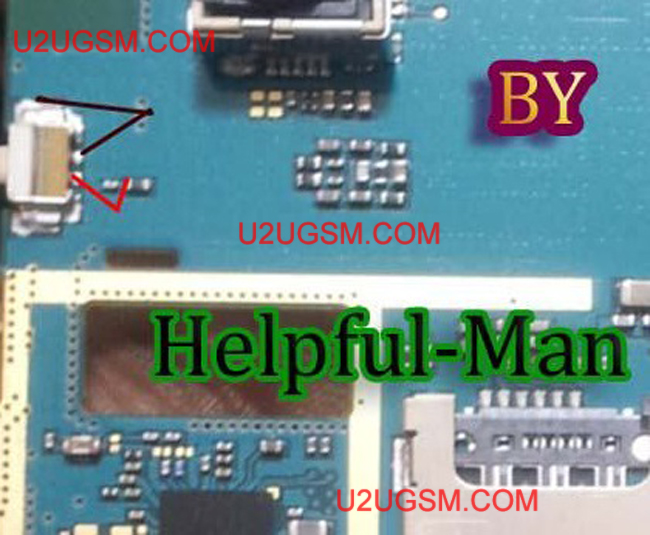
Samsung Young 2 SM-G130H Power On Off Key Jumper, Track, Ways
Samsung Young 2 SM-G130H On
Samsung Young 2 SM-G130H In the power ON-OFF, other than it is in the matrix keyboard flex is also connected to the keyboard filter IC. The solution below shows the connection line paths of the power key, this is useful without changing the filter IC and this can be used without having to connect the power key filter IC.
Just refer to the solution given below and track said main power line roads.
Only manage to apply a jumper wire in places where the Samsung Young 2 SM-G130H connecting said power key. This can help change without compromising the IC filter matrix or keyboard flex.
Samsung Young 2 SM-G130H,Nokia,Power Button,Power Key,Power Switch,On Off Button, On Off Switch, Powerr Problem
Samsung Grand Neo I9060 Power On Off Key Button Switch Jumper Ways
Samsung Grand Neo I9060 Power On Off Key Button Switch Jumper Ways
Samsung Grand Neo I9060 charging ok, flash ok, but not powering phone, this mean power button cut/line problem.So now follow simple power button jumper ways.

If you are facing an energy problem in Samsung Grand Neo I9060 diagrams in this article can help. Continue with the following troubleshooting solutions and establish bridges necessary for the points that have been damaged.
Samsung Grand Neo I9060 Dead does not start Solution
Samsung Grand Neo I9060 keys Power Jumper
Samsung Grand Neo I9060 On Off Button Ways
Samsung Grand Neo I9060 power button point Trick damaged bridge. Trace point of damage to the meter or check off switch with a new one. We can check problem button to connect the phone to the charger with mobile entertainment indicator appears on the screen and pressing the power button, then this is a power button problem. See diagram and apply jumpers as diagram.
Read more »
Samsung Grand Neo I9060 charging ok, flash ok, but not powering phone, this mean power button cut/line problem.So now follow simple power button jumper ways.

If you are facing an energy problem in Samsung Grand Neo I9060 diagrams in this article can help. Continue with the following troubleshooting solutions and establish bridges necessary for the points that have been damaged.
Samsung Grand Neo I9060 Dead does not start Solution
Samsung Grand Neo I9060 keys Power Jumper
Samsung Grand Neo I9060 On Off Button Ways
Samsung Grand Neo I9060 power button point Trick damaged bridge. Trace point of damage to the meter or check off switch with a new one. We can check problem button to connect the phone to the charger with mobile entertainment indicator appears on the screen and pressing the power button, then this is a power button problem. See diagram and apply jumpers as diagram.
Monday, August 10, 2015
Nokia 5530 power on just variation tested solution
Nokia 5530 power on just variation tested solution
Nokia 5530 power on just variation tested solution
5530 power solution,nokia 5233 bsi line jumper,nokia 5530 no power solution,nokia 5530 no power,nokia 5530 power ic, 5530 no power solution, nokia 5530 power solution, 5530 no power, nokia 5530 no power on, nokia 5530 power problem, ic power nokia 5530, nokia 5530d no power,

nokia 5530d-1 no power, nokia 5530 shorting solution, power ic nokia 5530, nokia 5530 not power on, nokia 5530 short solution, nokia 5530d-1 board short, 5530 power ic, nokia 5530 full short solution, Nokia 5530d-1 power problem solution, letak ic power nokia 5530, nokia 5530d-1 short problem solution, NOKIA 5530d-1 NO POVER, nokia 5530d-1 display ic, ic power 5530
Read more »
Nokia 5530 power on just variation tested solution
5530 power solution,nokia 5233 bsi line jumper,nokia 5530 no power solution,nokia 5530 no power,nokia 5530 power ic, 5530 no power solution, nokia 5530 power solution, 5530 no power, nokia 5530 no power on, nokia 5530 power problem, ic power nokia 5530, nokia 5530d no power,

nokia 5530d-1 no power, nokia 5530 shorting solution, power ic nokia 5530, nokia 5530 not power on, nokia 5530 short solution, nokia 5530d-1 board short, 5530 power ic, nokia 5530 full short solution, Nokia 5530d-1 power problem solution, letak ic power nokia 5530, nokia 5530d-1 short problem solution, NOKIA 5530d-1 NO POVER, nokia 5530d-1 display ic, ic power 5530
Nokia 5230 power on just variation tested solution
Nokia 5230 power on just variation tested solution
Nokia 5230 power on just variation tested solution
5530 power solution,nokia 5233 bsi line jumper,nokia 5230 no power solution,nokia 5230 no power,nokia 5230 power ic, 5230 no power solution, nokia 5230 power solution, 5230 no power, nokia 5230 no power on, nokia 5230 power problem, ic power nokia 5230, nokia 5230d no power,

nokia 5230d-1 no power, nokia 5230 shorting solution, power ic nokia 5230, nokia 5230 not power on, nokia 5230 short solution, nokia 5230d-1 board short, 5230 power ic, nokia 5230 full short solution, Nokia 5230d-1 power problem solution, letak ic power nokia 5230, nokia 5230d-1 short problem solution, NOKIA 5230d-1 NO POVER, nokia 5230d-1 display ic, ic power 5230
Read more »
Nokia 5230 power on just variation tested solution
5530 power solution,nokia 5233 bsi line jumper,nokia 5230 no power solution,nokia 5230 no power,nokia 5230 power ic, 5230 no power solution, nokia 5230 power solution, 5230 no power, nokia 5230 no power on, nokia 5230 power problem, ic power nokia 5230, nokia 5230d no power,

nokia 5230d-1 no power, nokia 5230 shorting solution, power ic nokia 5230, nokia 5230 not power on, nokia 5230 short solution, nokia 5230d-1 board short, 5230 power ic, nokia 5230 full short solution, Nokia 5230d-1 power problem solution, letak ic power nokia 5230, nokia 5230d-1 short problem solution, NOKIA 5230d-1 NO POVER, nokia 5230d-1 display ic, ic power 5230
Subscribe to:
Posts (Atom)