Showing posts with label Samsung Galaxy Core II. Show all posts
Showing posts with label Samsung Galaxy Core II. Show all posts
Tuesday, August 11, 2015
Samsung Galaxy Core II Power On Off Button Ways
Samsung Galaxy Core II Power On Off Button Ways
Here is the solution for Samsung Galaxy Core II key not work on / off problem. This solution may help fix if the phone shows charging indication or charging icon when the battery charger is plug-in, but could not or can not turn it on.
Samsung Galaxy Core II Power On Off Key Jumper, Track, Ways
Samsung Galaxy Core II On

Samsung Galaxy Core II In the power ON-OFF, other than it is in the matrix keyboard flex is also connected to the keyboard filter IC. The solution below shows the connection line paths of the power key, this is useful without changing the filter IC and this can be used without having to connect the power key filter IC.
Just refer to the solution given below and track said main power line roads.
Only manage to apply a jumper wire in places where the Samsung Galaxy Core II connecting said power key. This can help change without compromising the IC filter matrix or keyboard flex.
Samsung Galaxy Core II,Nokia,Power Button,Power Key,Power Switch,On Off Button, On Off Switch, Powerr Problem
Read more »
Here is the solution for Samsung Galaxy Core II key not work on / off problem. This solution may help fix if the phone shows charging indication or charging icon when the battery charger is plug-in, but could not or can not turn it on.
Samsung Galaxy Core II Power On Off Key Jumper, Track, Ways
Samsung Galaxy Core II On
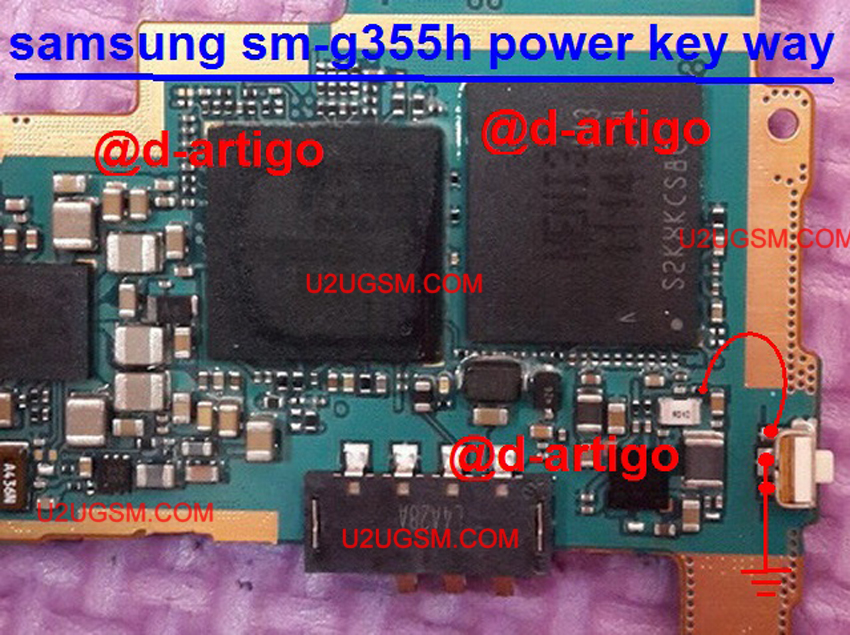
Samsung Galaxy Core II In the power ON-OFF, other than it is in the matrix keyboard flex is also connected to the keyboard filter IC. The solution below shows the connection line paths of the power key, this is useful without changing the filter IC and this can be used without having to connect the power key filter IC.
Just refer to the solution given below and track said main power line roads.
Only manage to apply a jumper wire in places where the Samsung Galaxy Core II connecting said power key. This can help change without compromising the IC filter matrix or keyboard flex.
Samsung Galaxy Core II,Nokia,Power Button,Power Key,Power Switch,On Off Button, On Off Switch, Powerr Problem

Samsung Galaxy Core II Camera not Working Problem Solution
Samsung SM-G355H Camera Problem Solution The camera connector Jumper Ways Samsung Galaxy II Core Problem Solution The camera not working
Here is the solution for Samsung Galaxy Core 2 SM-G355H showing "camera feature not supported" when trying to use or operate the camera in the device.

There are many factors that become issue to create problems occurred when the device water damaged or accidentally dropped or soaked in water.
If I encountered this problem you may first check the firmware flash or refurbished, so if the problem persists
You can then proceed to solve hardware problems.
This solution below shows the IC module camera holding the camera to work. If this chip become defective it will not recognize the camera operation and the result to show the camera feature not supported on the screen.
Samsung SM-G355H Camera Feature not supported Repair Solution -Hardware
The above solution showed the location of the chip camera module which where it is being mounted on the PCB Nokia E63. You may first try to clean the camera connector or replace if the camera feature not supported problem continues to exist.
Samsung G355H camera Forms solutions, Camera Solution Jumper Ways Will not Work Problem.
Read more »
Here is the solution for Samsung Galaxy Core 2 SM-G355H showing "camera feature not supported" when trying to use or operate the camera in the device.

There are many factors that become issue to create problems occurred when the device water damaged or accidentally dropped or soaked in water.
If I encountered this problem you may first check the firmware flash or refurbished, so if the problem persists
You can then proceed to solve hardware problems.
This solution below shows the IC module camera holding the camera to work. If this chip become defective it will not recognize the camera operation and the result to show the camera feature not supported on the screen.
Samsung SM-G355H Camera Feature not supported Repair Solution -Hardware
The above solution showed the location of the chip camera module which where it is being mounted on the PCB Nokia E63. You may first try to clean the camera connector or replace if the camera feature not supported problem continues to exist.
Samsung G355H camera Forms solutions, Camera Solution Jumper Ways Will not Work Problem.
Subscribe to:
Posts (Atom)