Tuesday, August 11, 2015
Samsung I8190 Galaxy S III mini Power On Off Button Ways
Here is the solution for Samsung I8190 Galaxy S III mini key not work on / off problem. This solution may help fix if the phone shows charging indication or charging icon when the battery charger is plug-in, but could not or can not turn it on.
Samsung I8190 Galaxy S III mini Power On Off Key Jumper, Track, Ways
Samsung I8190 Galaxy S III mini On
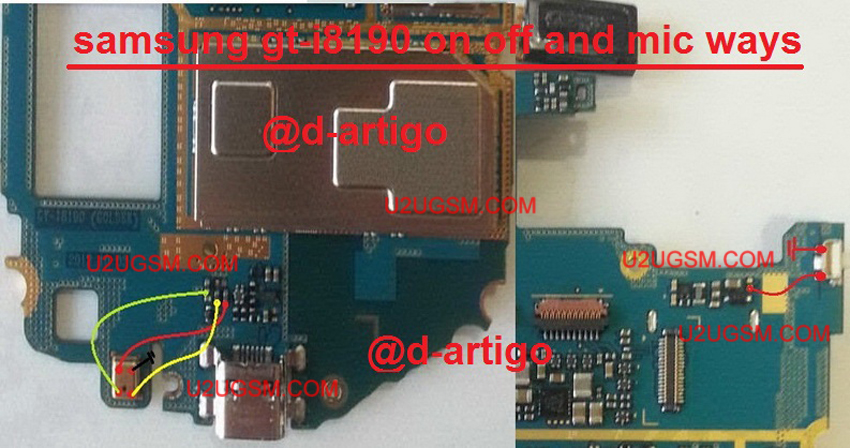
Samsung I8190 Galaxy S III mini In the power ON-OFF, other than it is in the matrix keyboard flex is also connected to the keyboard filter IC. The solution below shows the connection line paths of the power key, this is useful without changing the filter IC and this can be used without having to connect the power key filter IC.
Just refer to the solution given below and track said main power line roads.
Only manage to apply a jumper wire in places where the Samsung I8190 Galaxy S III mini connecting said power key. This can help change without compromising the IC filter matrix or keyboard flex.
Samsung I8190 Galaxy S III mini,Nokia,Power Button,Power Key,Power Switch,On Off Button, On Off Switch, Powerr Problem

Subscribe to:
Post Comments (Atom)
No comments:
Post a Comment