Showing posts with label Nokia 206. Show all posts
Showing posts with label Nokia 206. Show all posts
Tuesday, August 11, 2015
nokia 206 Insert Sim IC Solution Jumper Problem Ways
nokia 206 Insert Sim IC Solution Jumper Problem Ways
in case of insert sim problem in nokia 206 it will show insert sim, sim not valid, and may not show signal.to solve nokia 206 Insert Sim IC Solution Jumper Problem Ways we have to do a few simple steps as given in this post.in first step replace you sim and try it.scratch sim points in mobile slightly then try.

after dis assembly check all sim jack points at mother board with meter.check all these parts and track that are given in above diagram and if any of them is missing apply jumpers to make that path in good condition.if any of the components is missing replace it with new.
you can change sim ic also and may can apply jumpers after removing ic from mother board.there are some posts also to describe that how to make jumpers in sim ic to solve insert sim problem.
For more information and new tips and tricks about this problem solution keep visiting this page we will update it if there will be new updates.some related post are also given below you can read more about mobile phone.
Please note that although every diagram & solution posted on our website has been tested by one or more members of our team before posting,so we will not be responsible for any loss or damage, including personal injury.Use this repair solutions at your own risk.
nokia 206,Nokia,Insert Sim,Sim,Solution,Jumper,Problem,Ways
nokia 206 Insert Sim IC Solution Jumper Problem Ways Sim Not Working Sim Not Valid
nokia 206,Nokia,Insert Sim,Sim,Insert Sim Problem,Insert Sim Solution,Insert Sim Jumpers,Insert Sim Ways
Read more »
in case of insert sim problem in nokia 206 it will show insert sim, sim not valid, and may not show signal.to solve nokia 206 Insert Sim IC Solution Jumper Problem Ways we have to do a few simple steps as given in this post.in first step replace you sim and try it.scratch sim points in mobile slightly then try.
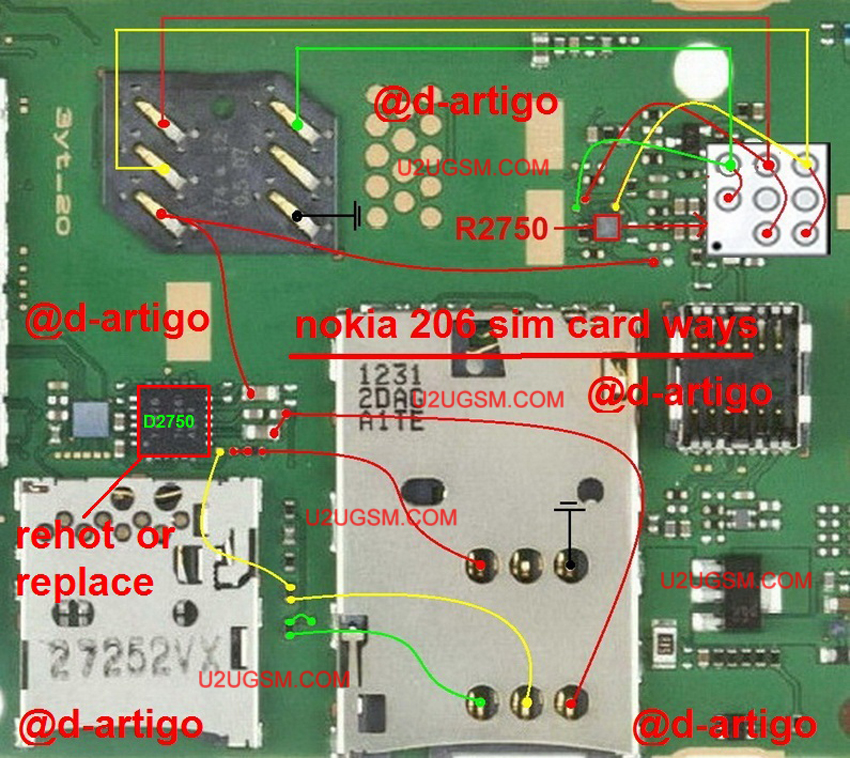
after dis assembly check all sim jack points at mother board with meter.check all these parts and track that are given in above diagram and if any of them is missing apply jumpers to make that path in good condition.if any of the components is missing replace it with new.
you can change sim ic also and may can apply jumpers after removing ic from mother board.there are some posts also to describe that how to make jumpers in sim ic to solve insert sim problem.
For more information and new tips and tricks about this problem solution keep visiting this page we will update it if there will be new updates.some related post are also given below you can read more about mobile phone.
Please note that although every diagram & solution posted on our website has been tested by one or more members of our team before posting,so we will not be responsible for any loss or damage, including personal injury.Use this repair solutions at your own risk.
nokia 206,Nokia,Insert Sim,Sim,Solution,Jumper,Problem,Ways
nokia 206 Insert Sim IC Solution Jumper Problem Ways Sim Not Working Sim Not Valid
nokia 206,Nokia,Insert Sim,Sim,Insert Sim Problem,Insert Sim Solution,Insert Sim Jumpers,Insert Sim Ways

Nokia 206 Handsfree Solution Jumper Problem Ways
Nokia 206 Hands free Solution Jumper Problem Ways
in case of hands free problem normally we can see a hands free symbol on screen.in this case we can not hear voice from speaker and mic will not work in hands free mode.so temporary solution is use a hand free with mobile.

permanent solution is open mobile and after dis assambly of mobile check hand free points on board.in some mobiles handfree is not attached with board and it can be taken out and replace without solding.try to change handfree if it is not sold.
if solding and value is not good in print then you have to remove it.then check all path and parts.if any component or track is missing apply jumpers as given in above diagram.you may have to replace these parts if required.
For more information and new tips and tricks about this problem solution keep visiting this page we will update it if there will be new updates.some related post are also given below you can read more about mobile phone.
Please note that although every diagram & solution posted on our website has been tested by one or more members of our team before posting,so we will not be responsible for any loss or damage, including personal injury.Use this repair solutions at your own risk.
Nokia 206,Nokia,Handsfree,Solution,Jumper,Problem,Ways
Nokia 206 Handsfree Solution Jumper Problem Ways Handsfree Not Working
Nokia 206,Nokia,Handsfree,Handsfree Problem,Handsfree Solution,Handsfree Jumpers,Handsfree Ways
Read more »
in case of hands free problem normally we can see a hands free symbol on screen.in this case we can not hear voice from speaker and mic will not work in hands free mode.so temporary solution is use a hand free with mobile.

permanent solution is open mobile and after dis assambly of mobile check hand free points on board.in some mobiles handfree is not attached with board and it can be taken out and replace without solding.try to change handfree if it is not sold.
if solding and value is not good in print then you have to remove it.then check all path and parts.if any component or track is missing apply jumpers as given in above diagram.you may have to replace these parts if required.
For more information and new tips and tricks about this problem solution keep visiting this page we will update it if there will be new updates.some related post are also given below you can read more about mobile phone.
Please note that although every diagram & solution posted on our website has been tested by one or more members of our team before posting,so we will not be responsible for any loss or damage, including personal injury.Use this repair solutions at your own risk.
Nokia 206,Nokia,Handsfree,Solution,Jumper,Problem,Ways
Nokia 206 Handsfree Solution Jumper Problem Ways Handsfree Not Working
Nokia 206,Nokia,Handsfree,Handsfree Problem,Handsfree Solution,Handsfree Jumpers,Handsfree Ways
Subscribe to:
Posts (Atom)