Showing posts with label Camera Jumpers. Show all posts
Showing posts with label Camera Jumpers. Show all posts
Tuesday, August 11, 2015
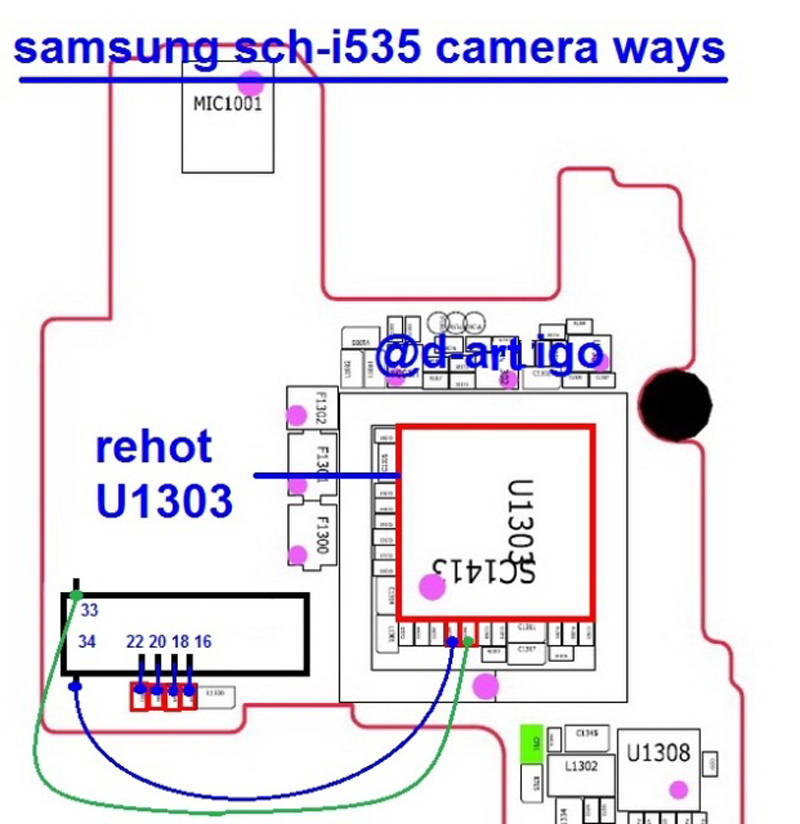
Samsung Galaxy S III Verizon Camera not Working Problem Solution
Samsung Galaxy S III Verizon sch-i535 Camera not Working Problem Solution Samsung Galaxy S III Verizon sch-i535 Camera not Working Problem Solution Samsung Galaxy S III Verizon sch-i535 camera
try to replace it with a new camera
rehot camera ic LDO in U600 and U601
if it is still as before .... check the voltage of his work in C609 and enable it in the R606 camera and his camera clock at Samsung Galaxy S III Verizon sch-i535 see the picture below

only thank button
Samsung Galaxy S III Verizon sch-i535 Camera not Working Problem Solution
I had a chance again to repair the Samsung Galaxy S III Verizon sch-i535 after swimming in sea water, after the general recovery remained faulty camera error "Unexpected error. Restart your phone " .
By simple inspection, found that there is no supply voltage of 1.8 volts camera. Responsible for it marked on the stabilizer circuit phone Samsung S8500 as N1515 , unfortunately without any labeling. First I would like to power the camera from the voltage VIO is also 1.8 volts, the camera certainly earned after I gave food, but the phone went to reboot after a few seconds the camera.
Replacement stabilizer N1515
Find similar stabilizer of phones Nokia , which is on disassembly I could not, but found the stabilizer to the required settings in the phone Samsung D900 . Stabilizer from Samsung is marked R1114D181D-TR-F and position number U320 , where he also serves as a stabilizer on the camera. That's him, the camera on the phone began to work as expected, without any reboots. Stabilizer is made in a small package, place it on the board Nokia N8 was not difficult. Firstly removed the faulty N1515 and choke L1515 us as they are no longer needed, connect terminal B1 and B2 together and connected to the 6th conclusion (switching control), A2 is connected to the 1st conclusion (supply voltage Vbat ), to simplify layout and minimize wires mounted second conclusion is soldered to the body and the third output (output of 1.8 volts) on C1 . In general, a compact and properly. More clearly seen in the photo:
Read more »
try to replace it with a new camera
rehot camera ic LDO in U600 and U601
if it is still as before .... check the voltage of his work in C609 and enable it in the R606 camera and his camera clock at Samsung Galaxy S III Verizon sch-i535 see the picture below
only thank button
Samsung Galaxy S III Verizon sch-i535 Camera not Working Problem Solution
I had a chance again to repair the Samsung Galaxy S III Verizon sch-i535 after swimming in sea water, after the general recovery remained faulty camera error "Unexpected error. Restart your phone " .
By simple inspection, found that there is no supply voltage of 1.8 volts camera. Responsible for it marked on the stabilizer circuit phone Samsung S8500 as N1515 , unfortunately without any labeling. First I would like to power the camera from the voltage VIO is also 1.8 volts, the camera certainly earned after I gave food, but the phone went to reboot after a few seconds the camera.
Replacement stabilizer N1515
Find similar stabilizer of phones Nokia , which is on disassembly I could not, but found the stabilizer to the required settings in the phone Samsung D900 . Stabilizer from Samsung is marked R1114D181D-TR-F and position number U320 , where he also serves as a stabilizer on the camera. That's him, the camera on the phone began to work as expected, without any reboots. Stabilizer is made in a small package, place it on the board Nokia N8 was not difficult. Firstly removed the faulty N1515 and choke L1515 us as they are no longer needed, connect terminal B1 and B2 together and connected to the 6th conclusion (switching control), A2 is connected to the 1st conclusion (supply voltage Vbat ), to simplify layout and minimize wires mounted second conclusion is soldered to the body and the third output (output of 1.8 volts) on C1 . In general, a compact and properly. More clearly seen in the photo:

Samsung Galaxy Note II N7100 Camera Problem Solution
Samsung Galaxy Note II N7100 Camera Problem Solution The camera connector Jumper Ways Samsung Galaxy II Core Problem Solution The camera not working
Here is the solution for Samsung Galaxy Core 2 SM-G355H showing "camera feature not supported" when trying to use or operate the camera in the device.

There are many factors that become issue to create problems occurred when the device water damaged or accidentally dropped or soaked in water.
If I encountered this problem you may first check the firmware flash or refurbished, so if the problem persists
You can then proceed to solve hardware problems.
This solution below shows the IC module camera holding the camera to work. If this chip become defective it will not recognize the camera operation and the result to show the camera feature not supported on the screen.
Samsung Galaxy Note II N7100 Camera Feature not supported Repair Solution -Hardware
The above solution showed the location of the chip camera module which where it is being mounted on the PCB Nokia E63. You may first try to clean the camera connector or replace if the camera feature not supported problem continues to exist.
Samsung G355H camera Forms solutions, Camera Solution Jumper Ways Will not Work Problem.
Read more »
Here is the solution for Samsung Galaxy Core 2 SM-G355H showing "camera feature not supported" when trying to use or operate the camera in the device.

There are many factors that become issue to create problems occurred when the device water damaged or accidentally dropped or soaked in water.
If I encountered this problem you may first check the firmware flash or refurbished, so if the problem persists
You can then proceed to solve hardware problems.
This solution below shows the IC module camera holding the camera to work. If this chip become defective it will not recognize the camera operation and the result to show the camera feature not supported on the screen.
Samsung Galaxy Note II N7100 Camera Feature not supported Repair Solution -Hardware
The above solution showed the location of the chip camera module which where it is being mounted on the PCB Nokia E63. You may first try to clean the camera connector or replace if the camera feature not supported problem continues to exist.
Samsung G355H camera Forms solutions, Camera Solution Jumper Ways Will not Work Problem.
Samsung Galaxy Core II Camera not Working Problem Solution
Samsung SM-G355H Camera Problem Solution The camera connector Jumper Ways Samsung Galaxy II Core Problem Solution The camera not working
Here is the solution for Samsung Galaxy Core 2 SM-G355H showing "camera feature not supported" when trying to use or operate the camera in the device.

There are many factors that become issue to create problems occurred when the device water damaged or accidentally dropped or soaked in water.
If I encountered this problem you may first check the firmware flash or refurbished, so if the problem persists
You can then proceed to solve hardware problems.
This solution below shows the IC module camera holding the camera to work. If this chip become defective it will not recognize the camera operation and the result to show the camera feature not supported on the screen.
Samsung SM-G355H Camera Feature not supported Repair Solution -Hardware
The above solution showed the location of the chip camera module which where it is being mounted on the PCB Nokia E63. You may first try to clean the camera connector or replace if the camera feature not supported problem continues to exist.
Samsung G355H camera Forms solutions, Camera Solution Jumper Ways Will not Work Problem.
Read more »
Here is the solution for Samsung Galaxy Core 2 SM-G355H showing "camera feature not supported" when trying to use or operate the camera in the device.

There are many factors that become issue to create problems occurred when the device water damaged or accidentally dropped or soaked in water.
If I encountered this problem you may first check the firmware flash or refurbished, so if the problem persists
You can then proceed to solve hardware problems.
This solution below shows the IC module camera holding the camera to work. If this chip become defective it will not recognize the camera operation and the result to show the camera feature not supported on the screen.
Samsung SM-G355H Camera Feature not supported Repair Solution -Hardware
The above solution showed the location of the chip camera module which where it is being mounted on the PCB Nokia E63. You may first try to clean the camera connector or replace if the camera feature not supported problem continues to exist.
Samsung G355H camera Forms solutions, Camera Solution Jumper Ways Will not Work Problem.
Subscribe to:
Posts (Atom)