Tuesday, August 11, 2015
Samsung Galaxy Star S5282 Not Charging USB Problem Solution
Issue: -
Usb charging solution Samsung Galaxy S5282 Star,
Samsung Star S5282 Galaxy unrecognized USB not detected
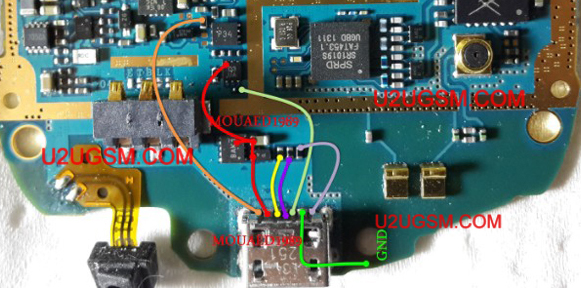
Diagnosis: -
Connect the USB cable to the PC and the phone jack, Reading notifications on the phone screen or not recognized. Check out you can save data to the memory card or not. Replace the USB data cable and try again.
Replace the USB charger and retry may be charged or not.
Solution: -
If you are facing problems loading Samsung S5282 Galaxy star and has tested all previous steps to resolve this problem in it. Dis mount the phone and then look in the phone water damage and carbon. Keep it clean with cleaning of electronics and apply heat with a heat gun to be dry.
Note the heat should not be more and more, because it can damage the skin and damage the motherboard. So keep in normal flow and look at the parts carefully.
Track of all these paths and components as shown in the diagram above. all these clues are given in different colors so you can easily find ways to bridge.
Track all these paths and components as shown in diagram above. all these tracks are given in different colors so that you can find out the jumper ways easily.
Samsung Galaxy Star S5282,Usb,Charging,Problem,Solution,Jumper,Ways
usb not charging, Usb not recognized, charging not save, not charging

Subscribe to:
Post Comments (Atom)
No comments:
Post a Comment